
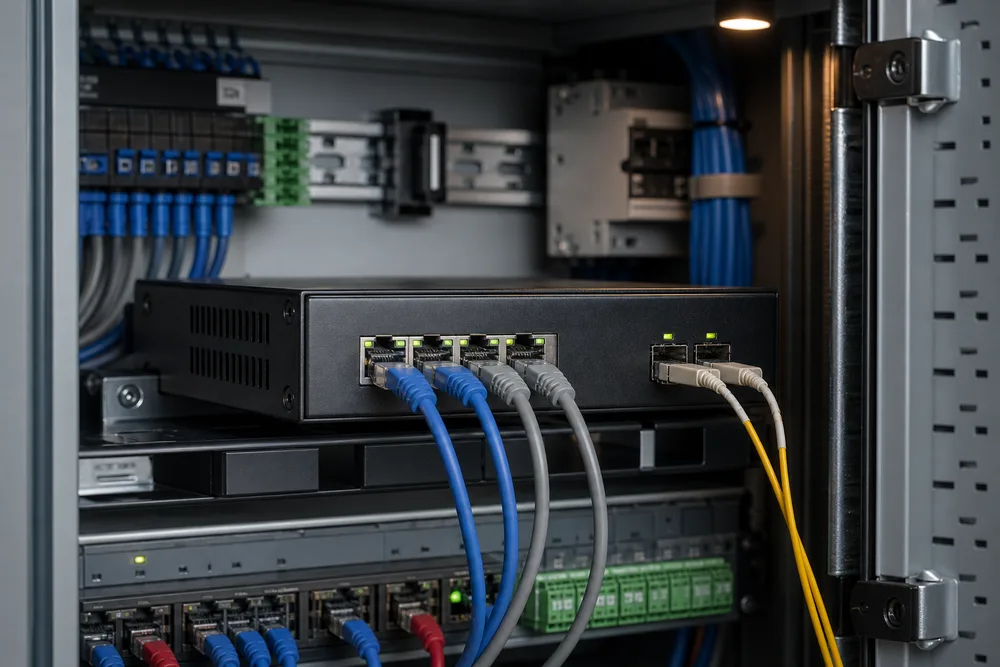
Key Takeaways: 4 RJ45 Ports, 2 Gigabit SFP Slots, and Unmanaged Fiber Uplinks
- OPT-2206 provides 4 × 10/100/1000Base-TX RJ45 ports and 2 × Gigabit SFP slots.
- Its unmanaged design suits local copper devices that need a straightforward fiber uplink.
- Supported SFP choices include 1000BASE-SX and 1000BASE-LX types; select the module to match the installed fiber.
- Optional VLAN isolation should be specified where local port-to-port traffic separation is required.
- Typical uses include workgroups, IP surveillance, SMB networks, and copper-to-fiber backbone connections.
The OPT-2206 solves a common edge-network problem: you have several copper endpoints in one location, but the upstream path needs to run over fiber. Four Gigabit RJ45 ports handle the local devices, while two GE SFP slots give you flexibility in the fiber side of the link. That is more useful than a fixed-fiber switch when one site has multimode cabling and the next has single-mode plant, or when link distance and connector requirements differ between projects.
OPTONE factory-direct is the manufacturer’s supply approach: switches, SFPs, media converters, and related optical interconnect products come from the same Shenzhen supplier rather than being assembled into a quote through unrelated distribution layers. For a buyer, the practical value is coordination. You can define the switch, optical module type, connector, quantity, and OEM requirement together, then confirm that the selected SFP is appropriate for the deployed fiber path. The OPT-2206 Fiber Ethernet switch is an unmanaged model, so it is best for installations that do not need day-to-day switch configuration.
FAQ: Port Configuration, SFP Compatibility, Fiber Selection, CCTV Use, and VLAN Isolation
What is the OPT-2206 port configuration?
The switch has four 10/100/1000Base-TX RJ45 Ethernet ports for copper devices and two Gigabit SFP slots for fiber connections. The SFP slots are uplink-capable interfaces, but your network design determines whether one or both are used. Check the intended topology before ordering, especially if the second fiber port is part of a downstream connection rather than a spare.
Which SFP modules are compatible?
OPTONE identifies 1000BASE-SX and 1000BASE-LX SFP compatibility. SX is normally selected for the appropriate multimode fiber installation, while LX is normally selected for the appropriate single-mode installation. Confirm the module’s optical parameters, connector style, and fiber type against the actual cable plant. A slot may accept an SFP mechanically while the optical link still fails because the modules or fiber do not match.
Can this switch be used for CCTV?
Yes. The OPT-2206 is presented for IP security surveillance, where cameras, NVR-side equipment, or local access devices need a fiber backbone connection. Do not assume it supplies power: PoE is not stated for this model. Cameras requiring Power over Ethernet need a separate PoE source or a PoE switch upstream or downstream, according to the site design.
What does optional VLAN isolation mean for an unmanaged switch?
Optional VLAN isolation is intended for deployments that need local traffic separation. Ask OPTONE to confirm the available isolation behavior before purchase, including which ports are isolated and how uplink communication is handled. “VLAN” can mean different implementation methods on unmanaged hardware; treating it as identical to a fully managed VLAN configuration is a costly assumption.
OPT-2206 Port Configuration and Deployment Comparison: Unmanaged Switching vs. Optional VLAN Isolation
Unmanaged Fiber Ethernet Switches are often the right answer at the network edge because there is less to configure and fewer settings for an installer to get wrong. Connect the copper devices, insert the correctly selected fiber modules, and build the uplink. That simplicity is valuable in a small equipment room, retail site, guard post, or surveillance cabinet where there is no network engineer logging into the switch later.
Isolation changes the conversation. If several endpoint groups share the same compact switch, you may want to limit direct local traffic paths while retaining an uplink route. Specify that requirement before the purchase order, not after a camera system is live and devices can see traffic they were never meant to exchange. The comparison below distinguishes the decision points without implying management functions that have not been stated for the model.
| Deployment point | Unmanaged switching | Optional VLAN isolation |
|---|---|---|
| Best fit | Simple workgroup or copper-to-fiber extension | Endpoint groups needing defined local separation |
| Commissioning focus | Correct cable and SFP selection | Confirm the requested isolation policy with OPTONE |
| Common buyer error | Assuming fiber modules are included or interchangeable | Assuming it offers the same controls as a managed switch |
The metal housing is suited to a practical installed environment, but enclosure material is not a substitute for assessing heat, dust, power quality, grounding, and cabinet space at the site. Those details cause more field failures than the switch’s basic port count.
How to Connect Gigabit Copper Devices to a Fiber Backbone with 1000BASE-SX or 1000BASE-LX SFP Modules
The fiber link should be specified from the installed cable outward, not from the switch slot inward. First identify what is already in the building or between buildings: fiber type, connector termination, route condition, and required reach. Then select a matching Gigabit SFP. 1000BASE-SX and 1000BASE-LX are the stated compatible module families, but the correct choice still depends on the actual optical path. Do not order modules by color, price, or a label copied from an old bill of materials.
- Record the fiber type, installed connector, expected route distance, and endpoint equipment at both ends.
- Select the appropriate 1000BASE-SX or 1000BASE-LX SFP pair and verify that the two ends are optically compatible.
- Insert the SFP modules into the GE SFP slots and connect clean, correctly terminated fiber patch leads.
- Connect local endpoints to the four RJ45 ports using suitable Ethernet cabling.
- Power the equipment, check link status, and test the complete path before closing the cabinet or handing over the site.
Cleanliness matters. Dust on an optical end face can turn a sound design into an intermittent link, especially after patching work in a cramped cabinet. Keep protective caps on until connection, inspect and clean connectors using the procedures your field team follows, and avoid bending patch leads sharply. For the product details and inquiry route, see the 4-port Gigabit switch with 2 SFP uplinks.
Why Source Fiber Ethernet Switches from OPTONE: Shenzhen Manufacturer for Switches, SFPs, Media Converters, and OEM Projects
Buying a switch and buying a working link are not always the same thing. The switch is only one part of the installed path; modules, patching, fiber type, and the far-end interface all have to line up. OPTONE has operated from Shenzhen since 2003 and supplies optical transceivers, fiber media converters, AOC/DAC cables, and fiber Ethernet switches. That product spread matters to procurement teams trying to avoid a fragmented order with unclear responsibility for the optical portion.
Its switch range includes managed, unmanaged, PoE, and industrial DIN-rail models from Fast Ethernet through 10G. The transceiver portfolio spans 1G SFP through 800G OSFP/QSFP formats, with MSA-compliant and OEM-compatible options described by the company. The OPT-2206 should not be positioned as a substitute for managed aggregation equipment or an industrial switch where environmental requirements call for one. It is a compact unmanaged Gigabit access switch for a defined job. Buyers get better results by stating that job plainly: endpoint count, uplink type, fiber plant, isolation need, and the destination region for supply.
Request an OPT-2206 Quote: Specify Region, Quantity, Fiber Type, Distance, Connector, and VLAN Requirement
A usable quote starts with the details an engineer would need to build the link. State the delivery region and quantity first. Then identify the installed fiber as multimode or single-mode, the required route distance, and the connector termination you need at the patch point. If you have a far-end device already selected, include its interface or the SFP type it uses. That gives the supplier a chance to flag a mismatch before hardware arrives on site.
Also state whether you need optional VLAN isolation. Do not write only “VLAN required”; describe the endpoint groups and the intended traffic path, then ask for confirmation of the available behavior. If the project is an OEM program, provide branding, packaging, documentation, and forecast requirements early rather than treating them as a last-minute addition. OPTONE states a 3-year warranty for the OPT-2206, and the final order should retain the agreed module and switch configuration in writing. Use the official page to submit the project details and request a quote.
Specify the optical link before you order
Send your region, quantity, fiber type, distance, connector, and VLAN isolation requirement for an OPT-2206 quotation matched to the actual installation.
Need help selecting the right product?
Share your switch platform, link distance and quantity with an OPTONE engineer.
Talk to an Engineer →