
Key Takeaways for Selecting an 8-Fiber Gigabit Aggregation Switch
- The OPT-2810 combines 2 x 10/100/1000Base-TX RJ45 ports with 8 x 1000Base-FX SFP slots for Gigabit fiber aggregation.
- Choose the SFP module to match fiber type, connector, wavelength and required link distance at both ends of every run.
- Unmanaged switching suits fixed local networks, but it does not provide VLAN, traffic visibility or remote configuration controls.
- A useful RFQ identifies each fiber run, installed optic requirement, destination equipment, power environment and import documentation needs.
- For regional projects, verify local compliance documents, warranty handling, lead time and destination-country shipping terms before issuing a purchase order.
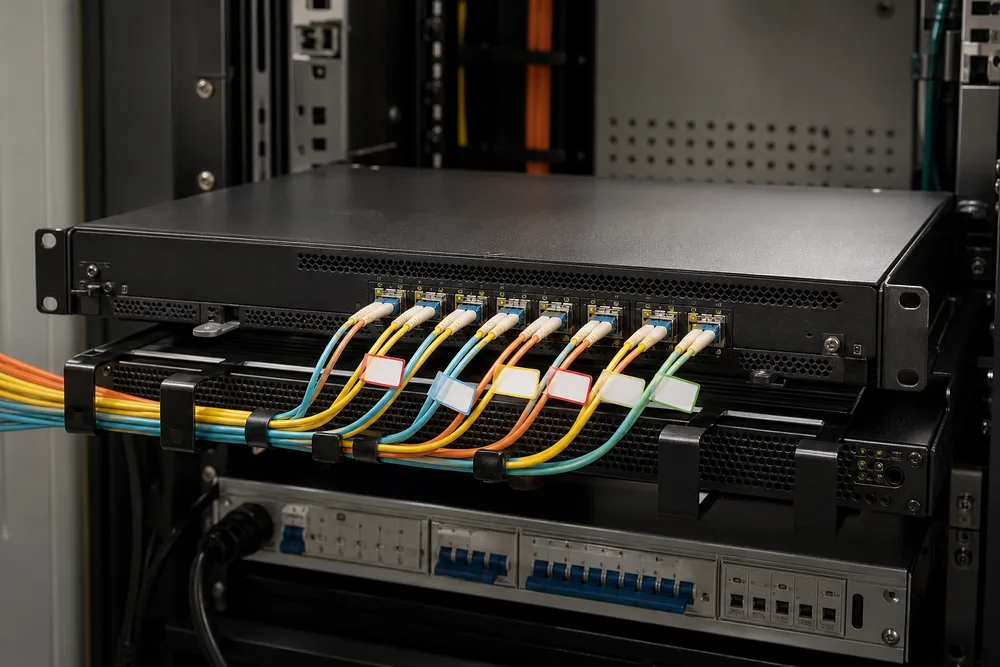
Direct answer: the right eight-fiber Gigabit switch is the one whose port mix and optic plan match the physical network, not simply the lowest unit price. The OPTONE OPT-2810 is an unmanaged 10-port Gigabit fiber switch designed around two copper access or uplink ports and eight SFP-based fiber connections. That makes it a practical shape for bringing several remote fiber links back into one cabinet in an enterprise, IP surveillance, FTTx or FTTB deployment.
The detail buyers should not skip is the optic. MSA-compliant SFP interoperability is the industry framework used by compatible Small Form-factor Pluggable modules: it standardises the mechanical form factor and electrical management interface so a switch and optic can identify and operate with each other within their supported design limits. It does not make any two installed links automatically compatible. A 1000BASE-SX optic on multimode fiber and a 1000BASE-LX optic on single-mode fiber solve different problems. Confirm the entire channel before you buy.
China Fiber Ethernet Switches can be a sensible procurement route for Southeast Asian projects, particularly where you need repeatable SFP configurations across multiple sites. The sensible workflow is to map links first, nominate optics second, then release the switch order. Reversing that order is how installers end up holding a carton of perfectly good modules that do not suit the installed cabling.
OPT-2810 Configuration and Selection Table: 2 Gigabit RJ45 Ports and 8 GE SFP Slots
Direct answer: the OPT-2810 configuration is 2 x 10/100/1000Base-TX RJ45 ports plus 8 x 1000Base-FX SFP slots in an unmanaged 10-port Gigabit switch. The copper ports give you straightforward connection points for an NVR, router, core switch, workstation or local distribution device. The eight SFP slots are the fiber-facing side of the design, allowing you to select appropriate Gigabit SFP modules per link rather than forcing every fiber route into one optical type.
| Selection item | OPT-2810 configuration | What you should confirm |
|---|---|---|
| Copper interfaces | 2 x 10/100/1000Base-TX RJ45 | Connected device speed, copper patching and the role of each port. |
| Fiber interfaces | 8 x 1000Base-FX SFP slots | SFP type, fiber mode, connector polish and link distance for each route. |
| Switching approach | Unmanaged | Whether the site needs VLANs, monitoring, prioritisation or remote administration. |
| Typical use | Fiber aggregation, enterprise access, IP surveillance and FTTx/FTTB | Traffic layout, cabinet location and downstream endpoint count. |
“GE SFP” in a purchasing conversation should be read as Gigabit Ethernet SFP connectivity, not as permission to insert any optical module with an SFP-shaped housing. The advertised fiber interface is 1000Base-FX. Specify 1G optics accordingly. If your design is moving to 10G uplinks, treat that as a different equipment selection exercise rather than assuming this switch can become a 10G aggregation point later.
Buyers also sometimes mistake eight SFP slots for eight pre-fitted optical ports. SFP slots accept modules; the installed modules should be listed separately in the RFQ unless the supplier confirms a bundled configuration. You can review the published OPT-2810 2 RJ45 and 8 GE SFP switch configuration before finalising that list.
Choosing Multimode or Single-Mode SFP Optics for Southeast Asian Fiber Projects
Direct answer: choose multimode or single-mode optics based on the fiber already installed and the required route length, not on a generic preference for one type. In a Jakarta office tower, a compact industrial estate in Penang, or a mixed-use site in Ho Chi Minh City, the fiber records are more useful than assumptions. Check the cable jacket marking, as-built drawings, splice records and the optic at the far end. If records disagree, test the link before ordering modules in volume.
Multimode and single-mode fiber have different core structures and are normally paired with different 1G optical families. The wrong pair may fail to establish a link, or appear to work briefly and then become unstable as loss, contamination or temperature expose the marginal optical budget. Matching labels is not enough. Confirm fiber type, wavelength family, connector interface and duplex orientation. The transmit strand at one end must reach the receive strand at the other.
When 1000BASE-SX Multimode SFP Modules Are Appropriate
Direct answer: 1000BASE-SX multimode SFP modules are appropriate where the installed link is multimode fiber and the route sits within the module and fiber-grade distance limits stated by the manufacturer. They are commonly considered for short building runs, equipment-room cross-connects and campus segments where multimode cabling is already present. Do not select SX simply because the run looks short on a drawing. A short single-mode run still calls for a single-mode-compatible optical plan.
Inspect connector end faces before installation. Dust on an LC ferrule is a very ordinary cause of intermittent links, especially after patching work in an active cabinet. Keep dust caps on unused modules and ports, clean with approved fiber-cleaning tools, and record which SFP is installed in each slot. That small discipline saves hours during fault isolation.
When 1000BASE-LX Single-Mode SFP Modules Are the Better Fit
Direct answer: 1000BASE-LX single-mode SFP modules are the better fit for installed single-mode fiber routes, particularly between buildings, roadside cabinets, remote surveillance locations or FTTB distribution points where cable distances can exceed an internal-building run. The actual supported distance still depends on the particular optic, fiber condition, connector and splice loss. Ask for the module datasheet rather than treating “LX” as a complete distance specification.
Single-mode projects deserve care at handover because field changes are common. A contractor may extend a route through a new patch panel, add a splice enclosure or substitute a pigtail. Each extra interface adds loss and a future inspection point. Keep the link schedule with the project documents and specify identical compatible optics at both ends unless the design explicitly uses a paired bidirectional optic arrangement.
How to Confirm Link-End Compatibility, Fiber Connectors and SFP Transmission Distance
Direct answer: confirm compatibility by checking the switch port, the SFP module, the physical fiber and the remote device as one link-end pair. For each connection, identify the remote switch, media converter, OLT-side device or other endpoint; then compare its supported optic type against the intended SFP for the OPT-2810. This avoids the familiar site problem where a new switch is installed correctly but cannot link because the remote end is fitted with a different optical standard.
Use a disciplined check before purchase:
- Read the installed cable marking or approved as-built record to establish multimode or single-mode fiber.
- Confirm the required Gigabit optical standard and wavelength family at both ends of each route.
- Verify connector type, usually the interface specified by the selected SFP, and inspect existing patch-panel adapters.
- Confirm that the fiber pair is correctly crossed from transmit to receive and that the route has usable strands available.
- Compare the route length and documented loss against the chosen optic manufacturer’s published limits.
- Clean connectors, label the port-to-fiber mapping and perform a link test during commissioning.
Transmission distance is not a switch-only specification. It belongs to the selected SFP and the actual fiber channel. A route with several old splices, a bent patch lead or contaminated connectors can fail even though its map distance appears acceptable. For a mixed project, list modules line by line. Eight slots do not require eight identical SFPs if one site has short multimode risers and another has single-mode building links.
For buyers comparing China fiber Ethernet switches, the valuable question is not “does it use SFP?” It is “can the supplier quote compatible 1G SFPs for each documented link end?” OPTONE’s eight-fiber Gigabit aggregation switch should be evaluated with that complete optic schedule attached.
How to Prepare an RFQ for an Eight-Fiber Aggregation, IP Surveillance or FTTB Project
Direct answer: a useful RFQ gives the supplier enough site information to quote the OPT-2810 and the correct optics without guessing. “Need 8-port fiber switch” is not enough. It leaves unanswered whether you require SFPs, whether the fiber is single-mode or multimode, what sits at the remote end, and whether the switch is intended for a clean office rack or a field cabinet with different environmental demands.
For IP surveillance, include the NVR location, remote camera-switch locations and any expected traffic concentration at the two copper ports. For FTTB, state the building distribution role and the upstream device. For enterprise aggregation, show the remote cabinet list. A one-page port map often prevents more errors than a long narrative specification. It also gives procurement teams a record they can use when checking delivered cartons.
Project Information to Confirm Before Requesting a Quotation
Direct answer: specify the switch quantity, the eight SFP-slot allocation and the optical requirement of every active fiber run. Identify fiber mode, approximate route distance, connector arrangement, remote equipment model or interface standard, and whether optics are required with the switches. State if you need spare SFPs for handover or maintenance; a spare policy is a commercial choice, but it should be deliberate.
Also identify the network function. An unmanaged unit is suitable for fixed aggregation, but not every network is fixed. If your design needs VLAN separation for tenants, camera traffic isolation, fault monitoring or policy-based control, say so before a quote is requested. Those requirements point toward a managed switch rather than an unmanaged OPT-2810.
Commercial, Shipping, Import and Local Power Requirements to Clarify
Direct answer: ask the supplier to confirm quoted currency, Incoterm, production lead time, shipping method, packing details, warranty process and the documents available for your destination. Southeast Asian import processes vary by country and by project type. Your freight forwarder or importer of record should confirm tariff classification, customs paperwork and any local approvals before shipment, rather than after goods reach the airport or port.
Power is another line item that gets left until commissioning. Provide the local mains arrangement and the installation location, then request confirmation that the supplied power arrangement suits the destination. Do not infer input range, plug style, grounding method or included accessories from a product photo. Ask for the exact supplied configuration in writing. That is especially relevant where equipment is ordered centrally but deployed across several countries.
When an Unmanaged Fiber Ethernet Switch Is the Right Choice for a Local Network
Direct answer: an unmanaged fiber Ethernet switch is the right choice where the topology is stable, the network team does not need per-port configuration, and the priority is simple Gigabit fiber extension or aggregation. The OPT-2810 is positioned as plug-and-play equipment, which can reduce installation steps in a straightforward local network. Connect the correct SFPs, make the copper and fiber patching, verify link status and document the port map.
That simplicity has a boundary. Unmanaged switching does not give you the administrative controls a managed design uses for VLAN segmentation, port monitoring, traffic policy, loop handling or remote diagnosis. A site with multiple tenants, sensitive operational technology, expanding Wi-Fi access, or cameras sharing bandwidth with business applications may outgrow a basic unmanaged layout. Buying unmanaged hardware to save a modest amount at the start can be expensive if a technician later has no visibility into a congested or mispatched segment.
Use this product category for clean, well-defined connections: a small fiber aggregation cabinet, a building distribution point, a surveillance control room with known endpoints, or an FTTB handoff arrangement that does not require switch-level policy. Confirm cabinet space, ventilation, fiber bend management and service access. A switch can be electrically correct and still become a maintenance problem if patch cords are pulled too tightly around a crowded enclosure.
OPTONE Factory-Direct Optical Connectivity Portfolio for Switch and SFP Sourcing
Direct answer: OPTONE can be considered as a single-source supplier for the switch and its optical connectivity components, which is useful when you want the quote, compatibility discussion and warranty path tied to one vendor. OPTONE Technology Limited was founded in Shenzhen in 2003 and supplies optical transceivers, fiber media converters, AOC/DAC cables and fiber Ethernet switches. Its switch range includes managed, unmanaged, PoE and industrial DIN-rail models across Fast Ethernet to 10G categories.
Factory-direct sourcing can simplify procurement, but it does not remove the buyer’s engineering checks. Give the supplier your end-device details and request the relevant SFP module information for every route. Ask how optic compatibility is handled, what part identification will appear on cartons, and how replacements are processed if a module is found faulty during commissioning. OEM compatibility requirements should be disclosed early where remote equipment expects a particular coding approach.
The strongest use of a consolidated source is consistency. You can order the OPT-2810, assign appropriate 1G SFP optics, and keep the same labelling convention across sites. The weak use is treating it as a substitute for an approved link design. If the project has existing third-party optics, test a representative link before broad deployment. Refer to the official OPTONE OPT-2810 fiber Ethernet switch page when aligning the quotation with the stated product configuration.
Compliance, Documentation and Support Requirements to Verify for Regional Deployment
Direct answer: verify compliance documentation against the destination country and the project’s own approval rules before placing an order. Do not assume a document accepted by one customer or market will satisfy another. Ask which declarations, test reports, product labels, safety information and shipping documents are available for the exact switch and power configuration being offered. Your local compliance adviser, importer or project consultant should determine what is required for the actual deployment country.
Documentation matters later as much as it matters at import. Request a quotation that clearly separates switch model, SFP part numbers, quantities, warranty terms and accessories. Keep serial-number records where available, port maps, fiber test records, commissioning photos and the supplier contact path. If a link fails six months after handover, those files identify whether the likely issue is an optic, patch lead, remote device or fiber plant rather than inviting an unnecessary switch replacement.
OPTONE identifies a 3-year warranty for its product offering; confirm the warranty terms applicable to your order, the start point, exclusions, return process and regional support route. Also clarify turnaround expectations for replacement units. For a hotel, commercial building or surveillance network, the operational cost of a failed uplink is normally much greater than the price of a spare optic kept in the local maintenance store.
Request a B2B, OEM or Direct-Purchase Quote for the OPT-2810: https://fibertransceiver.com/contact/
Direct answer: send a quote request with the OPT-2810 quantity, each required SFP type, fiber mode, remote-end interface, delivery country and project timeline. If you are buying for an installer, distributor, ISP, enterprise team or OEM programme, include the commercial format you need: direct purchase, recurring supply, labelled packaging or a project-based bill of materials. Clear inputs produce a quote that can be approved and installed with fewer revisions.
Attach the port map if you have one. If you do not, list the eight fiber destinations in plain language and identify which are multimode and which are single-mode. Ask the supplier to show switches and optics as distinct lines, confirm the offered module compatibility, and state anything still requiring site confirmation. That gives your engineering and purchasing teams a clean basis for sign-off.
Build an OPT-2810 Quote Around Your Actual Fiber Map
Provide your switch quantity, SFP requirements, fiber type, remote equipment and destination country to request a B2B, OEM or direct-purchase quotation for the OPT-2810.
Need help selecting the right product?
Share your switch platform, link distance and quantity with an OPTONE engineer.
Talk to an Engineer →