
- The OPT-6016 product page identifies 16 Gigabit SFP fiber ports and an RJ45 console port; confirm the exact ordering configuration before you assume managed features.
- Match 1000BASE-SX to the installed multimode fiber plant and 1000BASE-LX to single-mode links, then check connector, distance, optical budget, and coding requirements.
- For HD CCTV aggregation, the switch is only one part of the decision. Confirm camera traffic, uplink architecture, power arrangements, cabinet conditions, and fault-recovery expectations.
- Ask OPTONE to confirm supplied versus optional SFP modules, firmware status, power input, warranty, compliance documents, lead time, and destination-country requirements in writing.
Key Takeaways for Selecting a 16-Port Gigabit Fiber Aggregation Switch
A 16-port fiber aggregation switch looks straightforward until it reaches a riser cabinet, a school campus rack, or a CCTV control room. The real buying decision is not simply “16 ports and Gigabit.” You need to know what each port will connect to, which fiber is already in the building, whether the switch must make traffic decisions, and what happens when a contractor changes an SFP during a maintenance call.
The OPT-6016 is described by OPTONE as a 16-port Gigabit SFP fiber switch for enterprise optical networks and HD CCTV aggregation, with an RJ45 console port and optional 1.25G SFP modules. That makes it relevant where many optical edge links need to land in one location. It does not, by itself, answer every design question. A console connector is not proof that the ordered unit exposes a full managed feature set. Likewise, an SFP cage is not the same thing as a supplied optic.
Start with the installed cable plant. In many Southeast Asian retrofit projects, older multimode runs appear in one building while single-mode fiber connects separate buildings or distant gates. Treat those as separate procurement lines. Buyers also regularly miss the practical details: LC connector condition, patch-cord polarity, spare optics on site, rack space, grounding practice, and the ambient conditions inside an unconditioned cabinet.
For an accurate starting point, review the OPT-6016 16-port Gigabit fiber switch product information alongside the cable schedule, not after the equipment purchase order has been released.
OPT-6016 Management Status: Why Buyers Must Confirm Firmware, Console Access, VLAN Functions, and Ordering Configuration
The word “unmanaged” deserves careful treatment here. The product name refers to a Full Gigabit L2 Unmanaged Fiber Switch, while the supplied OPTONE description also lists an RJ45 console port. Those details can coexist, but they should prompt a direct configuration check rather than an assumption. In the field, buyers have lost time because a console port was read as a guarantee of VLAN menus, trunk settings, loop protection, port mirroring, or a web interface. It is not a guarantee unless the supplier confirms the firmware and available functions for the exact unit being quoted.
Ask for a written statement covering the switch operating mode, installed firmware, console purpose, supported configuration interface, and any L2 controls required by your network. If your design depends on VLAN separation between cameras, tenant networks, access-control devices, and office traffic, that point belongs on the purchase specification. Do not leave it as a verbal request to the reseller.
OPTONE’s MSA-compliant optics approach is particularly relevant at the interface between switch and transceiver. Multi-Source Agreement compliance means an optical module follows an industry-defined mechanical and electrical interface so it can fit and communicate in compatible SFP equipment. It does not mean every coded module will be accepted by every host, nor does it make unsupported management functions appear in a switch. Host compatibility, EEPROM coding, digital diagnostics availability, and the switch firmware are separate issues. Ask OPTONE to confirm the complete switch-and-optic combination.
Use this handover sequence before ordering:
- Provide the fiber schedule, endpoint count, and the purpose of each optical link.
- State whether you require VLANs, port isolation, monitoring, mirroring, loop controls, or only unmanaged forwarding.
- Request confirmation of the OPT-6016 firmware, console access function, and ordering code.
- List the SFP type required per port, including fiber mode, connector, wavelength class, and compatibility coding where applicable.
- Obtain the final port map and quotation description before payment or shipment.
This is less glamorous than comparing headline port counts. It is also where most avoidable integration errors are stopped.
1000BASE-SX vs. 1000BASE-LX: SFP, Fiber Type, and Link-Distance Comparison for Southeast Asian Projects
1000BASE-SX and 1000BASE-LX are not interchangeable labels. SX is the usual Gigabit Ethernet optical choice for multimode fiber, typically using an 850 nm optical channel. LX is normally used on single-mode fiber at 1310 nm. The right selection follows the fiber type already installed; it should not be chosen simply because one module is cheaper or more available from local stock.
Standard reach figures are useful as a first filter, not as a site guarantee. A typical 1000BASE-SX link reaches up to 550 metres on suitable multimode fiber, with actual reach affected by the fiber grade, patching, losses, and test condition. A conventional 1000BASE-LX single-mode link is commonly specified for up to 5 kilometres. Different LX-class optic variants may be offered for other reaches, so read the actual module datasheet and do not substitute a long-reach device without checking receive-power limits and the optical path.
| SFP standard | Usual fiber pairing | Typical optical channel | Common planning use | Check before purchase |
|---|---|---|---|---|
| 1000BASE-SX | Multimode fiber | 850 nm | Same-building floors, short campus segments | Multimode grade, loss, LC patching, actual route length |
| 1000BASE-LX | Single-mode fiber | 1310 nm | Building-to-building and longer external runs | Optical budget, route loss, receive level, matching module at far end |
Humidity, lightning exposure, construction damage, and poor patch-panel housekeeping are frequent causes of trouble in the region, but they do not change the SX/LX rule. Inspect and clean connectors, test the installed route, and make sure both ends use compatible Gigabit optics. A clean single-mode route with the wrong SX module will still fail.
How to Specify a Fiber Ethernet Switch for Enterprise, Building, Campus, and HD CCTV Aggregation Projects
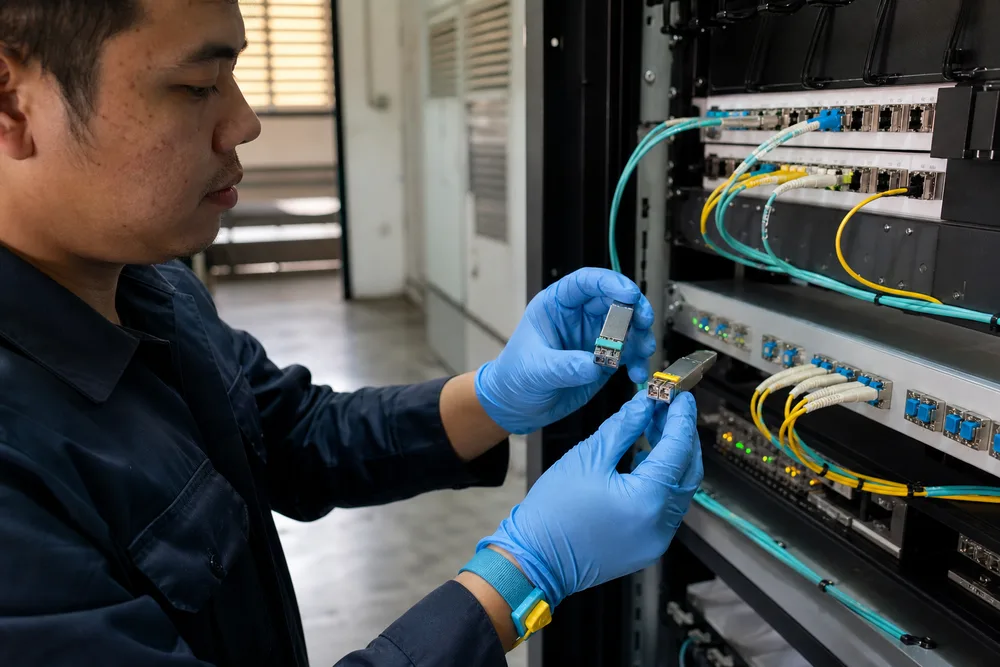
A good switch specification starts at the far end of the fiber, not at the rack. For an enterprise floor, identify the access switches, their uplink type, traffic separation needs, and the outage tolerance of the business units they serve. For a building or campus project, map each duct route, splice point, cabinet, and handoff. For HD CCTV, identify camera groups, recorder location, live-view demand, retention traffic paths, and whether any camera location requires local copper conversion or PoE equipment. The OPT-6016 is a fiber aggregation device; it does not replace a PoE access switch where cameras are powered over Ethernet.
Port count needs some headroom, but unused ports alone are not useful contingency. Keep documented spare fiber cores, compatible SFP spares, and labelled patch leads. A spare port cannot restore service if the only available replacement optic is SX and the failed link is single-mode LX. This sounds obvious. It is one of the most common stockroom mismatches.
For projects using the 16-port OPT-6016 fiber aggregation switch, put the following items in the bid document: number of active SFP ports, optical module type by port, fiber mode, connector format, intended link reach, management requirement, console requirement, power arrangement, mounting location, and acceptance-test evidence. Also ask who will perform initial link testing and what documentation will be supplied after commissioning.
There is a trade-off with unmanaged equipment. It can be appropriate for a fixed, simple topology because it reduces configuration work. It is less forgiving where multiple departments share infrastructure, where fault isolation must be rapid, or where policy requires traffic segmentation. If the project needs visibility or control, say so at the specification stage rather than trying to add it during commissioning.
FAQ: Which SFP Module Should I Choose for Single-Mode or Multimode Fiber?
Choose a 1000BASE-SX SFP for a compatible multimode fiber link and a 1000BASE-LX SFP for a compatible single-mode fiber link. Then verify the actual fiber type from test records or cable markings, because “fiber” on a drawing is not enough. The module at the remote end must be compatible with the chosen standard, speed, connector arrangement, and optical path.
OPTONE states that the OPT-6016 can use optional 1.25G SFP modules and supports single-mode and multimode fiber use. The 1.25G designation is normal for Gigabit SFP module signalling; it should not be interpreted as an assurance that the network will deliver more than a Gigabit Ethernet link. The host port, installed module, and far-end equipment must all be matched.
Ask your installer for the fiber test result if there is any doubt. On an existing site, look for damaged pigtails, mixed patch-cord types, dirty LC ferrules, undocumented splices, and unexpected attenuation. Those issues cause more failures than a minor difference in module price. For OEM-coded or mixed-vendor equipment, identify the host model at both ends and request compatibility confirmation before bulk purchase. If diagnostics are required for maintenance, ask specifically about DDM or DOM support in the optic and whether the host can display those readings.
FAQ: Is the OPT-6016 an Unmanaged Switch, and Can It Support Console Access or VLAN Configuration?
The OPT-6016 is presented in its product name as an L2 unmanaged fiber switch, and OPTONE’s supplied product description lists an RJ45 console port. You should confirm directly with OPTONE whether the exact unit and firmware offered to you provide any configurable functions, what the console port is used for, and whether VLAN configuration is available. Do not infer VLAN support solely from the presence of a console connector.
This distinction matters in multi-use installations. A small CCTV deployment with dedicated fibers may work well with simple unmanaged forwarding. A property operator sharing the same aggregation point between surveillance, office tenants, building management systems, and guest services may need defined VLAN behaviour and documented port controls. Those are different network designs, even if both use 16 optical ports.
Send the supplier a short functional checklist rather than an open-ended question. Ask for confirmation of VLAN capability, supported VLAN mode if applicable, management interface, console command access, default configuration state, loop-handling behaviour, monitoring support, and firmware identification. If those functions are mandatory, make confirmation a release condition on the order. If they are not required, keep the design simple and record that the system is intended to operate as unmanaged. Clear intent makes future troubleshooting much easier.
FAQ: Are 1.25G SFP Modules Included, and Is This Switch Suitable for HD CCTV and Enterprise Optical Networks?
OPTONE describes 1.25G SFP modules as optional for the OPT-6016, so you should not assume they are included. Request a quote that separates the switch from each optic line item and lists the SFP standard required for every active port. This prevents a familiar project delay: the switch arrives on site, the rack is ready, and the required optical modules are still in transit or are the wrong fiber type.
The stated applications include HD CCTV aggregation and enterprise optical networks. Suitability depends on the complete traffic and physical design, not the application label. For CCTV, establish how many cameras feed each edge location, how streams converge, where recording takes place, and whether the optical link carries only surveillance traffic. A congested shared link does not become adequate because its endpoints use fiber. For enterprise use, identify access-switch uplinks, redundancy expectations, and whether the network requires segmentation or monitoring functions beyond an unmanaged deployment.
Also separate optical transport from endpoint power. SFP ports carry the fiber connection; they do not indicate that remote cameras or access devices can be powered from those optical ports. Check where PoE is delivered, how it is protected, and how power failures at remote cabinets are handled. This is especially relevant for outdoor perimeter cameras, warehouse sites, resorts, and distributed industrial premises across Southeast Asia.
OPTONE’s MSA-Compliant Optics and Configuration-Confirmation Approach for OEM, Compliance, Power, Warranty, and Lead-Time Requirements
OPTONE Technology Limited, founded in Shenzhen in 2003, supplies optical transceivers, fiber media converters, AOC/DAC cables, and fiber Ethernet switches. Its stated switch range includes managed, unmanaged, PoE, and industrial DIN-rail models from Fast Ethernet to 10G, while its optics portfolio spans MSA-compliant formats from 1G through 800G. That breadth is useful for buyers who need a switch quote tied to specific optics rather than treating transceivers as an afterthought.
Still, procurement should be disciplined. “MSA compliant” describes an interface framework and is not a blanket statement about host acceptance, national approvals, warranty scope, or local stock. For an OEM or private-label requirement, explain the label, packaging, coded compatibility, documentation, and target market before samples are approved. For regulated projects, ask which compliance documents are available for the exact product and destination; do not use generic certificates from another model or another country.
Power is another item that should be confirmed rather than guessed. Request the specified power input, connector or terminal arrangement, included power accessories, and any site grounding guidance for the exact OPT-6016 configuration. The same applies to warranty terms, repair procedure, advance replacement expectations, production lead time, shipping method, and customs paperwork. A low unit cost can disappear quickly if a deployment stalls because the power arrangement or import document set was never clarified.
Give OPTONE a port-by-port schedule and ask for a single written response covering switch model, modules, compatibility, firmware status, commercial terms, and delivery commitment. That record is more useful than a broad assurance that the equipment is “compatible.”
Request an OPT-6016 Quote and Confirm Your Southeast Asia Project Configuration
Send a quote request with the information a technical sales team can act on: destination country, required quantity, planned installation date, fiber type per link, estimated route categories, SFP requirements, remote-end equipment, and any VLAN or console-access requirement. Include a photo of the existing patch panel or a simple port map if the project is a retrofit. It often exposes mixed single-mode and multimode infrastructure before the wrong modules are ordered.
Ask for confirmation that the quotation is for the intended OPT-6016 ordering configuration, not merely a generic 16-port fiber switch. If your project relies on optional optics, request the module part details and compatibility statement on the same quotation. For enterprise and CCTV deployments, this one step gives you a usable audit trail for installation, warranty support, and future replacement purchasing.
You can use the official OPT-6016 fiber Ethernet switch page as the reference point, then submit your actual link schedule for confirmation. Bring the fiber records and management requirements to that conversation; they determine the right configuration.
Confirm the switch, optics, and operating mode before release
Review the official OPT-6016 details, then request a project-specific quote covering SFP selection, fiber type, firmware and console status, commercial lead time, and destination requirements.
Need help selecting the right product?
Share your switch platform, link distance and quantity with an OPTONE engineer.
Talk to an Engineer →