
Why Fiber Instead of Copper?
Standard copper Ethernet (Cat5e/Cat6) is limited to about 100 meters per link. That limit works fine inside a single room or floor, but it breaks down the moment you need to connect two buildings, a remote cabinet, or a camera at the far end of a large facility.
Fiber optic links remove that constraint:
- Distance. Multimode fiber reaches roughly 300–550 m depending on speed and cable grade; single-mode fiber runs from 10 km to 70 km+ with the right transceiver.
- EMI immunity. Fiber carries light, not electrical signals, so it is unaffected by electromagnetic interference from motors, welding bays, high-voltage lines, and radio equipment — a decisive advantage on factory floors and in transportation infrastructure.
- Security and reliability. Optical links are harder to tap than copper, and they are not affected by ground loops or voltage surges between buildings.
- Bandwidth headroom. Fiber ports support 1 Gbps (SFP) and 10 Gbps (SFP+) today, with 25/40/100G paths in data centers.
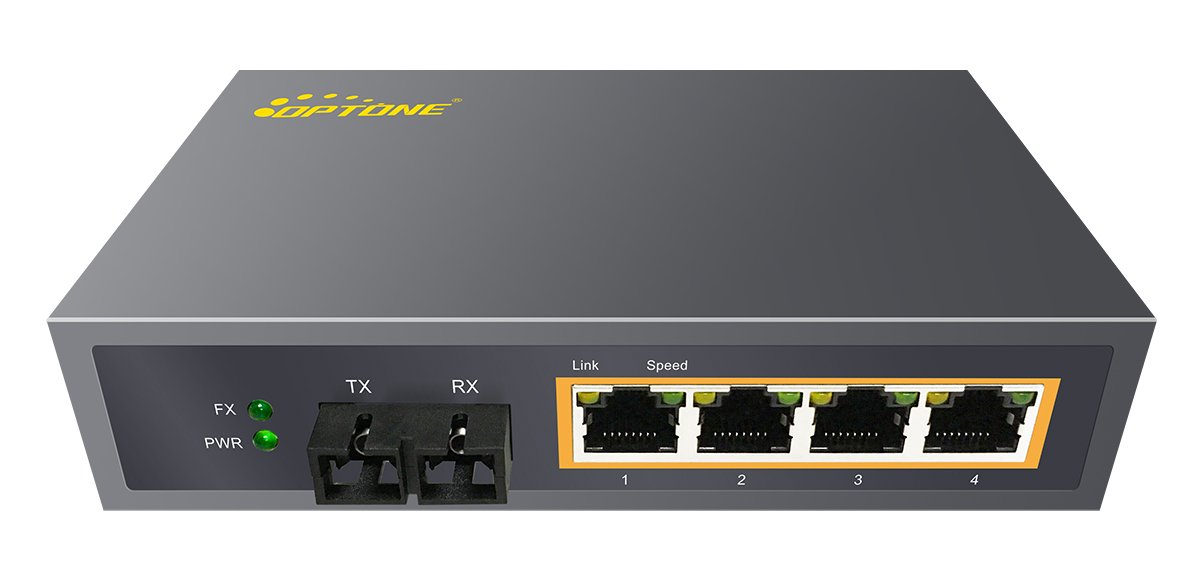
What Is a Fiber Ethernet Switch?
A fiber Ethernet switch is a network switch with fiber optic ports. It forwards Ethernet frames between connected devices, but instead of (or in addition to) RJ45 copper ports, it provides SFP/SFP+ slots or fixed fiber interfaces.
Most practical models are hybrid: 8/16/24 copper (RJ45) ports for cameras, access points, or workstations, plus 2–4 SFP slots for fiber uplinks to the core or between buildings. Pure all-fiber switches also exist for backbone and aggregation roles.
Switch vs media converter? A media converter bridges one copper link to one fiber link (point to point). A switch with SFP ports does the same job at scale, adds more ports, and gives you management, VLANs, and redundancy. If you need to connect many devices — or plan to grow — choose a switch.
Managed vs Unmanaged vs Smart
The single biggest decision is how much control you need.
| Feature | Unmanaged | Smart (web-managed) | Managed (L2/L3) |
| Configuration | None — plug and play | Basic via web UI | Full: CLI, web, SNMP |
| VLAN segmentation | No | Yes | Yes |
| QoS for voice/video | No | Limited | Yes |
| Link aggregation | No | Some models | Yes |
| Remote monitoring (SNMP) | No | Limited | Yes |
| Security (ACLs, 802.1X) | No | Limited | Yes |
| Redundancy (RSTP/ring) | No | Some models | Yes |
| Best for | Small flat networks, budget projects | Growing networks that need VLANs without a full IT team | Industrial plants, campuses, ISPs, security-critical networks |
Rule of thumb: If you only need connectivity, an unmanaged switch is cheaper and fine. If you need to segment traffic, secure the network, monitor it, or guarantee uptime with redundant rings, buy managed.
PoE: Do You Need It?
Power over Ethernet lets the switch deliver DC power to devices over the same cable — no separate power outlet at the device. That is what makes IP cameras, wireless access points, and VoIP phones practical to deploy anywhere.
Power levels follow three IEEE standards:
| Standard | Name | Max power per port (from switch) | Power available at device | Typical use |
| IEEE 802.3af (2003) | PoE | 15.4 W | 12.95 W | Older IP cameras, basic APs, VoIP phones |
| IEEE 802.3at | PoE+ | 30 W | 25.5 W | PTZ cameras, higher-power APs |
| IEEE 802.3bt Type 3/4 | PoE++ / 4PPoE | 60 W / 90 W | ~51 W / ~71 W | High-end PTZ with heaters, video phones, thin clients |
Two numbers matter, and buyers often confuse them:
- Per-port power — what each port can supply.
- Total PoE budget — what the whole switch can supply at once.
A switch can be “PoE+ on all ports” on paper but only have a total budget for four to eight full-power devices. Count the devices, sum their consumption (many PTZ cameras draw 20–30 W), and pick a budget with roughly 20% headroom.
Managed PoE adds value in surveillance: per-port power limits, PoE watchdog (auto-reboot unresponsive cameras), and power scheduling.
SFP vs SFP+ and Single-Mode vs Multimode Fiber
The fiber port standard is SFP (Small Form-factor Pluggable) — a hot-swappable module carrying 100 Mbps or 1 Gbps. SFP+ slots carry 10 Gbps; SFP28 goes to 25 Gbps.
The two fiber families:
| Multimode (MMF) | Single-mode (SMF) | |
| Core | 50/62.5 µm (OM3/OM4/OM5) | 9 µm (OS2) |
| Wavelength | 850 nm | 1310 / 1550 nm |
| Typical reach (1G) | Up to 550 m | 10 km (LX), ~70 km (ZX) |
| Typical reach (10G) | 300 m (OM3) / 400 m (OM4) | 10 km (LR), 40 km (ER), 80 km (ZR) |
| Cost | Cheaper transceivers, shorter reach | More expensive optics, long reach |
| Best for | Inside a building, data center, short campus runs | Between buildings, campus backbone, metro/WAN |
Practical notes:
- The transceiver and the fiber must match: a single-mode SFP on multimode fiber (or the reverse) will not link reliably.
- Both use LC duplex connectors on the switch side; the cable plant (patch panels, pigtails, splices) must match the fiber type end to end.
- If you are not sure the 550 m multimode limit is enough, go single-mode for the backbone — it is more future-proof.
How to Choose a Fiber Ethernet Switch: Checklist
Work through this before you compare prices:
- Count the ports. How many devices connect at this location now — and in three years? Add uplink SFP slots: two is the minimum for redundancy, four for aggregation.
- Match the speed. Gigabit SFP covers most access deployments; SFP+ (10G) suits backbones, storage, and high-throughput surveillance centers.
- Decide distance and fiber type. ≤300–550 m inside a building → multimode is fine; anything between buildings or beyond → single-mode.
- Calculate PoE. Devices × consumption ≤ total PoE budget with headroom; confirm per-port power meets the most demanding device.
- Choose the management tier. Unmanaged for simple; managed when VLANs, QoS, security, or monitoring matter.
- Match the environment. Commercial switches for clean indoor racks; industrial switches (DIN-rail mount, fanless, wide temperature — typically −40 °C to +75 °C — dual power input, IP30+ rated) for factories, outdoor cabinets, and transport corridors.
- Plan redundancy. For uptime-critical links, look for dual power inputs, RSTP/MSTP, or Ethernet ring redundancy (ERPS).
- Check vendor support. Documentation quality, firmware update policy, transceiver compatibility list, warranty and return terms — these matter more than the sticker price in total cost of ownership.
What We See in the Field
[Replace with your own deployment experience — this paragraph is the Experience signal.]
In our deployments we see three recurring mistakes: (1) buying an unmanaged switch for a site that later needs VLANs and remote troubleshooting, which forces a full swap; (2) underestimating PoE budget, so cameras drop at night when IR LEDs and heaters draw peak power; and (3) mixing multimode and single-mode components in the same link. A 15-minute planning pass up front prevents all three.
Common Mistakes to Avoid
- Ignoring the 100 m copper limit and only discovering it on site.
- Under-specifying SFP slots — a switch with no spare uplink is a dead end for growth.
- Assuming every SFP slot is 10G — check SFP vs SFP+.
- Mismatching fiber types between the cable plant and transceivers.
- Buying on per-port PoE alone instead of total budget.
- Skipping management on security-sensitive or segmented networks.
- Ignoring temperature and vibration in industrial sites — commercial gear fails in cabinets.
FAQ
What is the difference between managed and unmanaged fiber switches? Unmanaged switches are plug-and-play with no configuration. Managed switches support VLANs, QoS, link aggregation, SNMP monitoring, security features (ACLs, 802.1X), and redundancy protocols — required for segmented, monitored, or industrial networks.
How far can a fiber Ethernet switch transmit? It depends on fiber type and transceiver. Multimode reaches up to about 550 m at 1G and 300–400 m at 10G. Single-mode reaches 10 km (LX/LR class) and roughly 70 km or more with long-reach ZX/ZR-class optics. Copper is limited to 100 m.
Do I need PoE on a fiber switch? Only if you power devices (IP cameras, wireless APs, VoIP phones) over the same cable. Choose PoE+ or PoE++ for higher-power devices, and check both per-port power and the total PoE budget.
What is the difference between SFP and SFP+? SFP slots support up to 1 Gbps fiber links; SFP+ supports 10 Gbps. They share the same physical size, but only SFP+ slots can carry 10G uplinks. SFP28 supports 25 Gbps.
Can a fiber switch connect to copper devices? Yes. Most fiber switches are hybrid: RJ45 copper ports for local devices plus SFP/SFP+ slots for fiber uplinks. Pure all-fiber models are for backbone roles.
Fiber switch or media converter — which do I need? A media converter bridges a single copper link to fiber point to point. A fiber switch does this at scale, adds ports, and enables management and redundancy. For more than a couple of links, or future growth, choose a switch.
Need help selecting the right product?
Share your switch platform, link distance and quantity with an OPTONE engineer.
Talk to an Engineer →