
What is a fiber media converter?
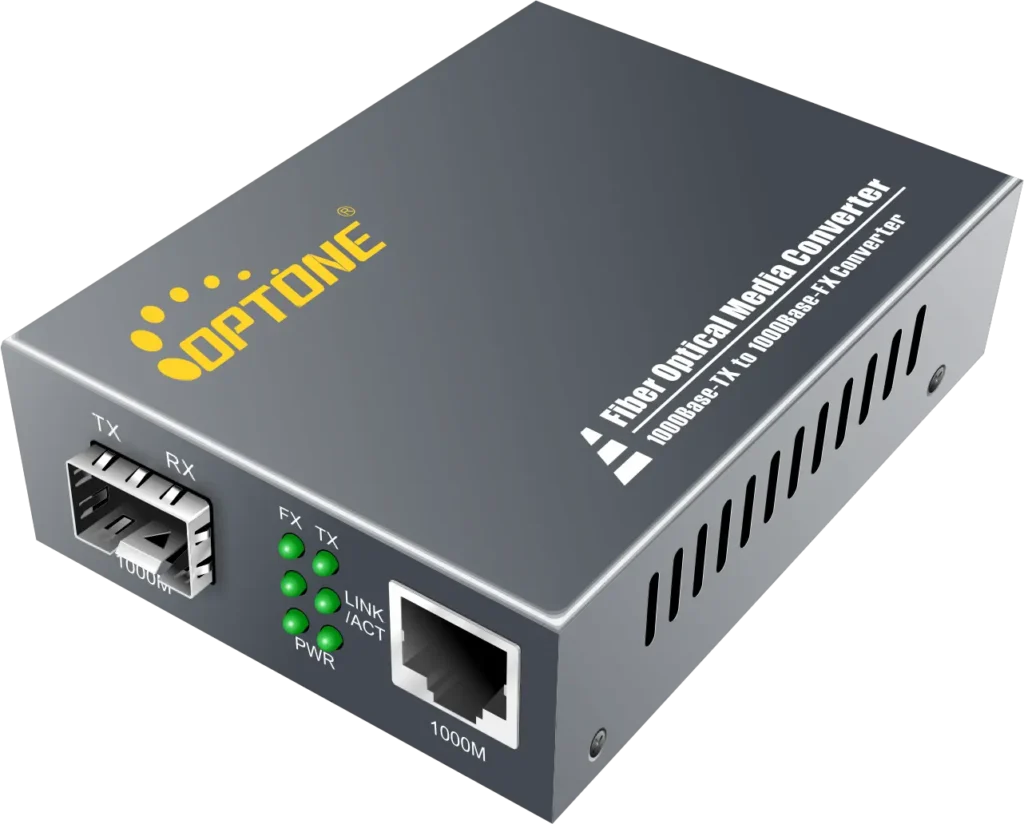
A fiber media converter is a compact, powered device that translates between copper Ethernet (RJ45) and fiber optic transmission. One side has a copper port — typically 10/100/1000 Mbps — and the other has a fiber interface, either fixed LC/SC ports or a pluggable SFP slot.
Converters are deployed in pairs, one at each end of the fiber run. On the copper side, each converter behaves like a transparent physical-layer device: your switch, NVR, or camera does not know the fiber exists. This is why you can keep your existing copper ports and still bridge a 40 km gap.
Switch / NVRcopper portCopper ≤ 100 mConverter ARJ45 → SFPFiber 550 m – 80 kmConverter BSFP → RJ45Copper ≤ 100 mCamera /switch
How a converter pair works: copper on both ends stays ≤100 m; the fiber segment carries the distance. The connected devices see a normal Ethernet link on each side.
Why use one: the benefits
- Distance without limits. The core reason. A converter pair replaces a 100 m copper ceiling with a fiber run that reaches roughly 2 km on multimode fiber and 10–80 km on single-mode, depending on the optics.
- EMI immunity. Fiber carries light, not electricity. On factory floors, along railways, near motors, elevators, and high-voltage lines, a fiber segment is immune to the electromagnetic noise that corrupts long copper runs.
- Lower upgrade cost. Instead of replacing switches or endpoints with fiber ports, you add one converter per end. You keep existing copper equipment and convert only the ports that need to cross distance.
- Protects your investment. Converters are physical-layer devices: they are easy to relocate, and they extend the useful life of legacy copper wiring plants and devices.
- Security. Optical fiber is harder to tap than copper, and it carries no electrical signal to eavesdrop on inductively.
- Power for remote devices. PoE media converters deliver power over the copper port, so an IP camera or access point at the far end needs no local outlet.
Distance comparison
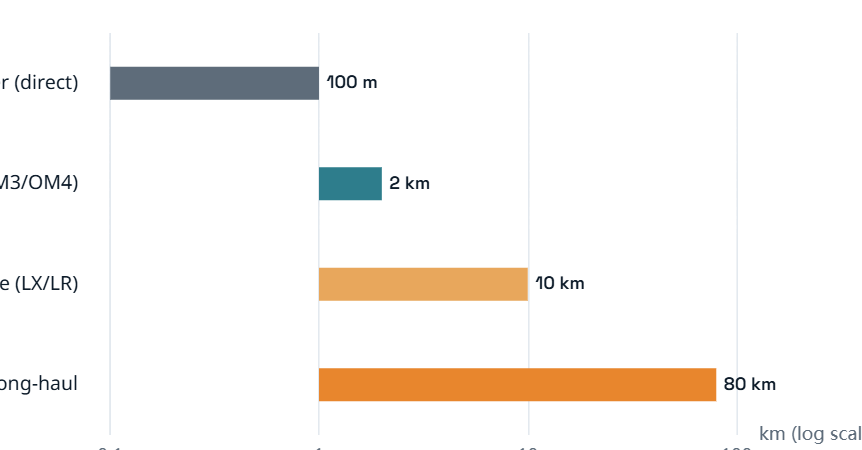
How far one link can go, with and without a converter (log scale). Copper: 100 m. Multimode fiber: ~550 m–2 km. Single-mode: 10 km (LX/LR class) up to 80 km with long-haul optics. Sources: IEEE 802.3 PHY tables, converter manufacturer documentation.
Keep the copper segments honest. A converter does not make copper faster or longer — it moves the distance problem onto fiber. On each side, keep the copper run within its rated length, and let the fiber segment do the long haul.
Where they are used
- IP surveillance and security. The most common use. Cameras sit hundreds of meters from the NVR — along perimeters, highways, parking lots, and airport grounds. A PoE media converter powers and connects the camera over fiber, eliminating both the distance problem and the need for a local outlet.
- Campus and building links. Connecting buildings 300–800 m apart is beyond copper but well within multimode fiber. Converters at each building entry make the fiber backbone transparent to the switches inside.
- Industrial automation. PLCs, sensors, and robot controllers on noisy factory floors connect over fiber with industrial converters: DIN-rail mount, wide temperature range, IP30 housing, and hardened EMC/ESD protection.
- ISP / FTTH access. Service providers use media converters at the network edge to hand fiber links to subscriber equipment that only has copper ports, including multi-gig access lines.
- Intelligent transportation. Traffic signal cabinets, roadside cameras, and monitoring equipment along rail and highway corridors, where EMI and distance both apply.
- Smart buildings and legacy migration. Converting legacy coaxial surveillance or old copper segments to IP over fiber without rewiring the whole site.
Types and features
Not all media converters are the same. Match the type to the job:
| Dimension | Option A | Option B |
| Management | Unmanaged — plug and play, lowest cost, no monitoring | Managed — web/SNMP/CLI, optical DDM (Rx power, temperature), VLAN pass-through, alarms |
| Fiber interface | Fixed LC/SC ports — locked to one speed and distance | SFP-based — swap modules to change speed, reach, or fiber type |
| Fiber count | Dual-fiber — one strand each direction | Single-fiber (BiDi) — one strand, two wavelengths (e.g., 1310/1550 nm), halves fiber use |
| Power | Non-PoE — data only | PoE / PoE+ — powers the remote camera or AP over the copper port |
| Environment | Commercial — indoor racks, desktop | Industrial — DIN-rail, wide temperature, IP30, hardened EMC/ESD |
| Form factor | Standalone — one or two per site | Rack chassis — 19-inch chassis with centralized power for many links at one site |
Link fault pass-through (LFP): the feature that saves you
Without LFP, a converter can mask a failure: if the fiber link drops, the copper side may stay “up,” so the switch keeps sending frames into a dead path — a silent failure that monitoring cannot see.
Link Fault Pass-Through (LFP) fixes this by propagating the link-down state from one side to the other: when the fiber side fails, the converter drops the copper link too (and vice versa). The connected switch sees link down, triggers its redundancy or alarm, and the fault is visible to the network — not hidden inside the converter.
Why it matters: in surveillance and industrial networks, an unnoticed dead link can mean hours of lost footage or a stopped production line. Enable LFP on both ends of every converter pair you deploy.
Media converter vs switch
They look similar and often sit in the same cabinet, but they do different jobs. A media converter is a point-to-point media translator: one copper link in, one fiber link out, no forwarding decisions. A switch connects many devices, forwards frames between them, and offers management such as VLANs and QoS.
Use a converter when the job is simply “get this one link across the distance.” Use a switch when multiple devices must connect at the far end — or when you need VLAN segmentation and monitoring at that location. Many sites use both: a converter pair for the backbone, a switch at the remote end for the devices.
What to check before buying
- Match the speed on both sides. Copper port and fiber port must agree — 10/100 Mbps or 10/100/1000 Mbps (and 10G SFP+ models for high-bandwidth backbones).
- Choose the fiber type and distance. Inside a building or campus (≤2 km) → multimode. Between sites or beyond → single-mode, with the right reach class (10 km, 40 km, 80 km optics).
- Pick the connector. LC is the default on modern SFP modules; older fixed-port converters may use SC or ST. The converter connector must match your fiber patch cord.
- Single fiber or dual fiber? If you only have one dark strand available, a single-fiber BiDi converter (1310/1550 nm) halves the fiber requirement.
- Do you need PoE at the far end? A PoE/PoE+ converter powers the remote camera or AP over copper — check the PoE budget against the device draw.
- Environment. Outdoor cabinets and factory floors need industrial units: DIN-rail mount, wide temperature, IP30, and EMC/ESD hardening.
- Enable LFP, or buy managed. For mission-critical or hard-to-reach links, choose a managed converter with DDM monitoring and alarms.
- Plan in pairs. Buy converters in matched pairs — the two ends must use the same wavelength and speed to link.
Common mistakes to avoid
- Running copper beyond 100 m on either side of the pair and blaming the converter.
- Mismatching wavelengths or speeds between the two ends of a pair — the link simply will not come up.
- Buying a single converter instead of a matched pair.
- Ignoring LFP and losing visibility into dead fiber links.
- Using a commercial converter in an outdoor or factory cabinet where an industrial unit is required.
- Choosing a media converter where a small switch would serve multiple remote devices better.
Frequently asked questions
What is a fiber media converter?
A fiber media converter is a device that translates between copper Ethernet (RJ45) and fiber optic transmission. It is deployed in pairs — one at each end of the fiber run — so an existing switch or camera with a copper port can connect across a fiber link without replacement.
What is the maximum distance of a media converter?
It depends on the fiber and optics. Multimode fiber reaches roughly 550 m to 2 km; single-mode reaches 10 km (LX/LR class) up to about 80 km with long-haul optics. Copper is limited to 100 m on either side of the pair.
Media converter vs switch — which do I need?
A converter joins one copper link to one fiber link — point to point. A switch connects multiple devices and adds management (VLANs, QoS, monitoring). Use a converter to carry a single link across distance; use a switch when several devices connect at the far end.
What is a PoE media converter?
A PoE media converter delivers power over its copper port using Power over Ethernet standards, so an IP camera or wireless access point at the remote end gets both data and power from the converter — no local electrical outlet required.
Single fiber or dual fiber media converter — what is the difference?
A dual-fiber converter uses one strand per direction. A single-fiber (BiDi) converter sends and receives on one strand using two wavelengths (typically 1310/1550 nm), halving the fiber you need — useful when only one dark fiber is available.
What is Link Fault Pass-Through (LFP)?
LFP propagates a link failure from one side of the converter to the other. When the fiber side drops, the converter also drops the copper link — so the connected switch sees link down and can trigger alarms or redundancy instead of silently sending traffic into a dead path.
Need help selecting the right product?
Share your switch platform, link distance and quantity with an OPTONE engineer.
Talk to an Engineer →