
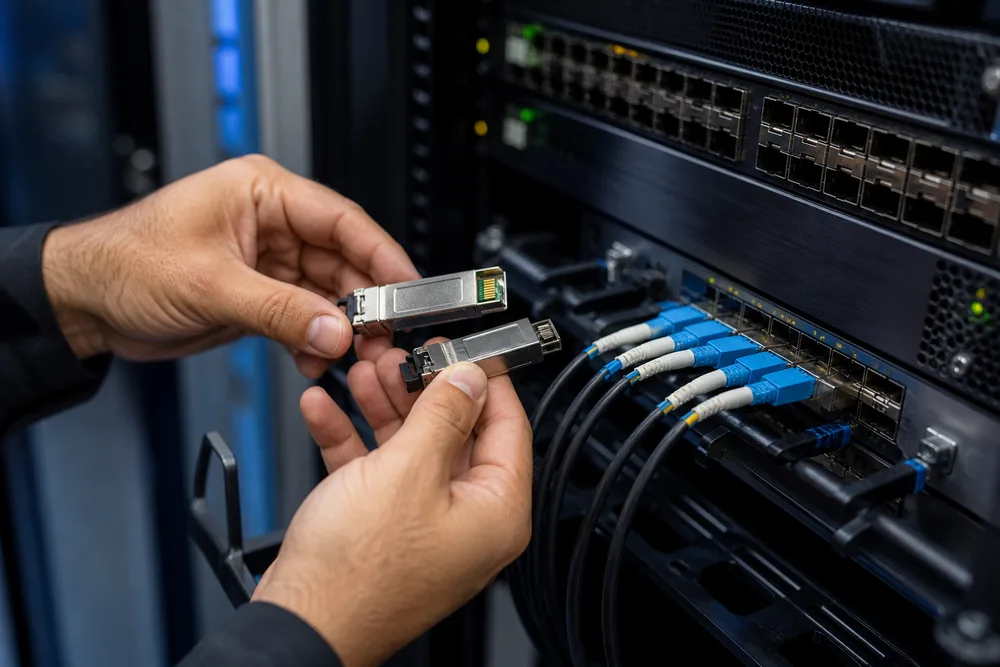
Key Takeaways for Selecting 25G Optical Transceivers
- Start with the host port and its approved coding requirements; a physically fitting SFP28 is not automatically accepted by every switch, router, NIC or storage platform.
- Match both ends of the circuit: fiber class, connector arrangement, optical type and reach must describe one compatible link.
- SR is a multimode option; LR, ER, BiDi and CWDM are used with single-mode fiber, subject to the selected model.
- Ask for diagnostic, temperature, compatibility and procurement documentation before releasing a multi-site order.
A 25GbE link usually fails for ordinary reasons, not mysterious ones: an SR module is installed on single-mode cabling, a simplex BiDi optic is ordered for a duplex patch panel, or a switch rejects a module because its EEPROM coding was never checked. The module may light up. That does not mean the link is fit for service.
OPTONE 25G SFP28 optical transceivers cover SR, LR, ER, BiDi and CWDM configurations, with duplex or simplex LC interfaces and multimode or single-mode fiber choices. Available reach depends on the individual configuration, from short 100 m links through to 40 km applications. The useful buying decision is therefore not “which 25G module is best?” It is which optical interface accurately matches the port, installed fiber plant, route length and operating conditions of this specific circuit.
One term deserves attention early: DDM/DOM diagnostics refers to the module’s digital monitoring function, which reports operating information from the transceiver to the host platform where supported. Teams use it to investigate marginal links, observe optical behavior over time and distinguish a dirty connector or fiber loss issue from a port or coding problem. It is valuable operational data, but it does not replace acceptance testing after installation.
Match the 25G SFP28 Module to Your Host Port, Fiber Plant and Required Reach
Procurement often begins with distance. It should begin with the host hardware. A 25G SFP28 module is designed for an SFP28 cage and a 25GbE interface, but host behavior still varies by platform, operating system and vendor policy. Some equipment accepts a broad set of MSA-compliant optics; other systems check vendor identification more tightly. That distinction can turn a low-cost order into a site visit, a support ticket and an emergency replacement shipment.
Next, inspect the cable plant rather than relying on a building drawing or a label on an old patch cord. Establish whether the permanent link is multimode or single-mode, how it is presented at each end, and whether any cross-connects, splice trays, passive multiplexers or legacy panels sit between the active ports. A short route does not make SR suitable if the plant is single-mode. Nor does a long route make ER necessary if the documented link loss and intended design point support another single-mode option.
Use the published OPTONE 25G SFP28 optical transceiver range as a configuration starting point, then submit the actual host and fiber details for review. That sequence keeps selection tied to the installed network rather than a generic datasheet category.
Confirm the SFP28 Form Factor, 25GbE Interface and OEM Host-Platform Requirements
Confirm that the port is intended to run at 25GbE with an SFP28 optical module. Do not infer this from a similar-looking cage or from a switch family name. Record the equipment manufacturer, exact chassis or appliance model, line card or NIC model, port type, network operating-system release and any vendor transceiver restrictions. Storage and telecom equipment deserve the same discipline; protocol support and platform qualification may matter as much as the physical connector.
Ask for OEM-compatible coding appropriate to the host platform, then retain that request in the purchase record. “Compatible with our switch” is too vague for a serious order. A clean request names the platform at each end, because mixed-vendor links may need different coding on the two modules even though the optical interface itself is the same.
Match Fiber Type, LC Connector Format and Compatible Modules at Both Ends of the Link
The fiber and connector arrangement are non-negotiable. SR configurations use multimode fiber and duplex LC connectivity. LR and ER configurations use single-mode fiber with duplex LC interfaces. BiDi options use single-mode fiber and simplex LC connections, transmitting and receiving on different wavelengths over one fiber strand. CWDM configurations are selected for single-mode links where wavelength allocation and passive CWDM equipment are part of the design.
Check polarity across the complete channel, not just the patch lead in your hand. Duplex links require the transmit path from one optic to reach the receive path at the other. Simplex BiDi links require an intended complementary pair. Ordering two identical BiDi modules can leave both ends transmitting and receiving on the wrong wavelengths, producing a link that never comes up.
25G SFP28 Selection Matrix: SR, LR, ER, BiDi and CWDM Modules Compared
These names describe different optical approaches, not a simple hierarchy of good, better and best. SR is commonly the sensible answer for short multimode runs in a data center. LR is the familiar duplex single-mode choice for longer building, campus and access links. ER addresses longer single-mode requirements within the available product range. BiDi saves fiber strands, while CWDM supports wavelength-planned single-mode infrastructure. Each introduces a different set of installation checks.
The table is a planning tool, not a substitute for confirming the exact part number. Reach, operating temperature, wavelength plan and optical characteristics are model-specific. Treat the 100 m to 40 km range as the span across OPTONE’s listed 25G SFP28 family, not as a claim for every module type.
| Configuration | Fiber and interface | Typical selection role | Critical check |
|---|---|---|---|
| SR | Multimode fiber, duplex LC | Short-reach 25GbE links | Confirm multimode fiber type and channel design |
| LR | Single-mode fiber, duplex LC | Duplex single-mode links | Confirm route loss and host compatibility |
| ER | Single-mode fiber, duplex LC | Longer single-mode routes | Review the complete optical budget and plant condition |
| BiDi | Single-mode fiber, simplex LC | Fiber-constrained links | Order complementary wavelength modules |
| CWDM | Single-mode fiber, typically duplex LC | Wavelength-managed infrastructure | Validate the passive CWDM channel plan |
Compare Multimode and Single-Mode Fiber Options, Duplex and Simplex LC Interfaces, and Link Reach
Multimode and single-mode are properties of the fiber system, not interchangeable module labels. Multimode plants are common inside data halls and some enterprise buildings; single-mode is prevalent in campus, metro, telecom and longer inter-building routes. A duplex LC connection uses two fiber paths. A simplex LC connection uses one. That one-strand efficiency is BiDi’s practical attraction, especially where ducts are full or a legacy circuit has only one usable strand.
Reach should be treated as a design boundary, not a target to casually exceed. Real channels include patch cords, connector pairs, fusion or mechanical splices, distribution frames and contamination. A link near its intended limit deserves a documented optical-loss review and clean end-face inspection before the optics are blamed.
When to Use SR, LR, ER, BiDi or CWDM for Data Center, Telecom and Enterprise Links
Choose SR for appropriate short multimode applications, often within a data-center row or building. Choose LR where the infrastructure is duplex single-mode and the required route fits the selected module’s published application. Choose ER only after confirming that the extra reach is actually required; longer-reach optics are not a cure for undocumented loss, poor connector hygiene or an incompatible fiber type.
BiDi is the right tool when conserving single-mode strands matters, but it demands careful pairing and labeling. CWDM makes sense where a planned wavelength scheme and compatible passive components are already in place or being designed together. For 5G fronthaul, CPRI, telecom access and enterprise links, the traffic application may influence the host and environmental requirement, yet the optical path still has to obey the same fiber, wavelength and power constraints.
How to Select and Validate a 25G Optical Transceiver Before You Order
The quickest way to reduce returns is to make compatibility review part of the order process, not a rescue step after delivery. A purchase order that merely says “25G SFP28 LR” leaves too much unresolved: coding, temperature class, connector format, paired wavelengths, required documentation and endpoint identities can all remain open. The seller cannot reliably solve omissions that were never supplied.
Build a small circuit record for each link type, then use it for both quotation and receiving inspection. This matters even more for staged projects. The first rack might use one switch model in a controlled data room; the second may use a different router in an outdoor cabinet. Same nominal speed. Different operational requirement.
Step-by-Step Compatibility Request Workflow for Switches, Routers, NICs and Storage Platforms
- Identify both endpoints. Provide manufacturer, exact model, port or card identity, software release and the quantity required per endpoint.
- Document the physical channel. State multimode or single-mode fiber, simplex or duplex LC presentation, route purpose and intended reach class.
- Select the optical architecture. Confirm SR, LR, ER, BiDi or CWDM based on that channel, including complementary wavelengths or passive channel assignments where relevant.
- Request compatibility review. Specify OEM coding needs for each host platform and ask for the proposed part number before ordering volume.
- Approve a sample path. For a new platform or mixed-vendor environment, validate representative modules in the actual host equipment.
- Record receiving and deployment data. Check labels, connector type, coding request and diagnostic visibility before modules are distributed across sites.
This workflow is deliberately plain. It catches the errors that cost the most: wrong interface on a remote site, a mismatched BiDi pair, or a module accepted on a bench but rejected by the production firmware.
Verify Optical Budget Parameters, DDM/DOM Diagnostics and Operating-Temperature Requirements
Ask for the relevant transmit and receive optical parameters for the chosen part, then have the link designer compare them with the measured or documented channel loss and any design margin policy. Do not use cable length alone as the deciding variable. A short route with several panels can be more troublesome than a longer, clean route with fewer joins.
DDM/DOM support should be confirmed alongside host support for displaying those readings. Diagnostic data can expose abnormal receive levels, temperature behavior or other changes that justify field investigation. It cannot identify every root cause by itself. Dirty end faces, damaged patch leads and excessive insertion loss still need ordinary physical inspection and test practice. Specify commercial or industrial temperature requirements early; a module selected for an air-conditioned equipment room may not be suitable for an exposed cabinet.
OPTONE 25G SFP28 Range: Factory-Direct Options for OEM-Compatible Global Deployments
OPTONE Technology Limited is a Shenzhen-based manufacturer founded in 2003. Its portfolio includes optical transceivers, fiber media converters, AOC/DAC cables and fiber Ethernet switches, with optical form factors spanning SFP, SFP+, QSFP+, QSFP28, QSFP-DD and OSFP from 1G through 800G. For buyers building a standardized supplier base, that broader portfolio matters because port speeds change while operational expectations around coding, documentation and supply continuity do not.
The OPTONE 25G SFP28 range is intended for applications including 25G Ethernet, Fibre Channel, 5G fronthaul and CPRI, serving telecom operators, data-center operators, ISPs and enterprise network teams. Available configuration families include SR, LR, ER, BiDi and CWDM, with multimode and single-mode choices, LC interface variants, DDM/DOM and commercial or industrial temperature options as applicable to the selected model.
Factory-direct procurement is useful when you need a compatibility discussion tied to a bill of materials rather than a catalog-only transaction. It also requires discipline from the buyer: submit exact platform information, request proposed coding, preserve approved samples and prevent substitutions by labeling the approved part number in your internal records. Review the available 25G SFP28 module configurations before sending a request, but let the final selection follow the circuit data.
Compliance, Quality and Procurement Documentation to Request for International Deployments
International projects create a paperwork problem as often as an optical one. A network integrator may need country-of-origin details, packing information, a formal quotation, traceable labels, a product datasheet, compatibility confirmation or documentation requested by its customer’s import and quality processes. Ask what can be supplied before the goods are booked. Trying to recover paperwork after cargo has reached a border is a poor procurement method.
For each 25G optic line item, request the manufacturer part number, stated interface type, fiber type, connector arrangement, designated reach, temperature category and OEM compatibility designation. If the application uses BiDi or CWDM, include the wavelength pairing or channel plan in the approved bill of materials. This prevents a remote installer from receiving modules that look identical but are meant for different ends of a circuit.
Quality review should include how units are identified, how configuration control is maintained between approved samples and production supply, and what information accompanies an issue report. MSA compliance is relevant for mechanical and electrical interoperability expectations, but it does not override a host vendor’s policy or prove that a particular coded module will be accepted in every firmware revision. Request confirmation for the actual platform, particularly on projects where vendor support terms are strict.
25G SFP28 Optical Transceiver FAQs
The questions below address the two mistakes that appear most often in 25GbE orders: assuming that fiber categories are interchangeable, and assuming that module names can be mixed freely. They cannot. The practical rule is simple: the two ends must form one designed optical channel, with compatible transmit and receive behavior, the correct physical fiber, and host-recognized modules.
If an existing circuit is unclear, stop before choosing a module. Inspect the panel labels, trace the strands where possible, review previous test records and identify the current optics. A photograph of a connector is not enough to establish the fiber type or wavelength plan. This is especially true in inherited enterprise sites, leased building links and telecom cabinets that have been modified over several years.
Which 25G SFP28 module should I use for multimode fiber versus single-mode fiber?
Use an SR configuration for an appropriate multimode-fiber 25GbE link. Use LR or ER for duplex single-mode applications according to the required reach and documented channel design. Use BiDi on single-mode fiber where a simplex, one-strand architecture is intended, and use CWDM on single-mode infrastructure designed around CWDM wavelengths and compatible passive components. Confirm the exact OPTONE part number, connector format and published reach before ordering.
Can SR, LR, ER, BiDi or CWDM modules be connected at opposite ends of the same link?
Generally, no. SR, LR and ER are different optical interfaces and should not be mixed as a substitute for proper link design. BiDi links require the specified complementary wavelength pair at opposite ends. CWDM links require matching wavelength planning through the passive infrastructure. The correct approach is to select a compatible pair of modules for the same link architecture, then validate them in the intended host platforms.
Request a 25G SFP28 Quote and Compatibility Support for B2B, SMB or Lab Orders
Send a compatibility request with the endpoint models, port details, software versions, fiber type, connector arrangement, route requirement, operating environment and quantity. If you have an installed sample or an incumbent part number, include that too. For a lab order, the priority may be coding and host acceptance. For an SMB deployment, it may be a clean mix of short multimode and building single-mode links. For a multi-country B2B rollout, approved part control and documentation may carry equal weight with unit price.
State any deadline tied to commissioning or export processing, but do not compress the review by omitting technical details. The right quote identifies the intended interface before the shipment leaves the factory. That is the point at which a fiber mismatch, missing complementary BiDi module or unsupported temperature class is cheapest to fix.
Discuss Your 25G SFP28 Link Requirements
Review OPTONE 25G SFP28 options and submit your host platform, fiber and reach details for a compatibility-focused quotation.
Need help selecting the right product?
Share your switch platform, link distance and quantity with an OPTONE engineer.
Talk to an Engineer →