
Fiber Ethernet switches connect Ethernet devices and network segments through optical fiber, giving you a practical way to carry data beyond the limits and site constraints of copper-only cabling. They may combine copper access ports with fiber uplinks, or use fiber interfaces more extensively where the network design calls for it. The right unit is defined less by its label than by its ports, optics, management needs, power delivery requirements, and installation environment.
For a campus, enterprise floor, or industrial site, fiber can link distant cabinets, separate parts of the network, and extend connectivity to places where a copper run is not the right answer. OPTONE offers fiber Ethernet switch categories spanning managed and unmanaged models, PoE/PoE+ options, industrial DIN-rail units, and product ranges from Fast Ethernet to 10G. The capabilities of any individual switch still need checking at model level.
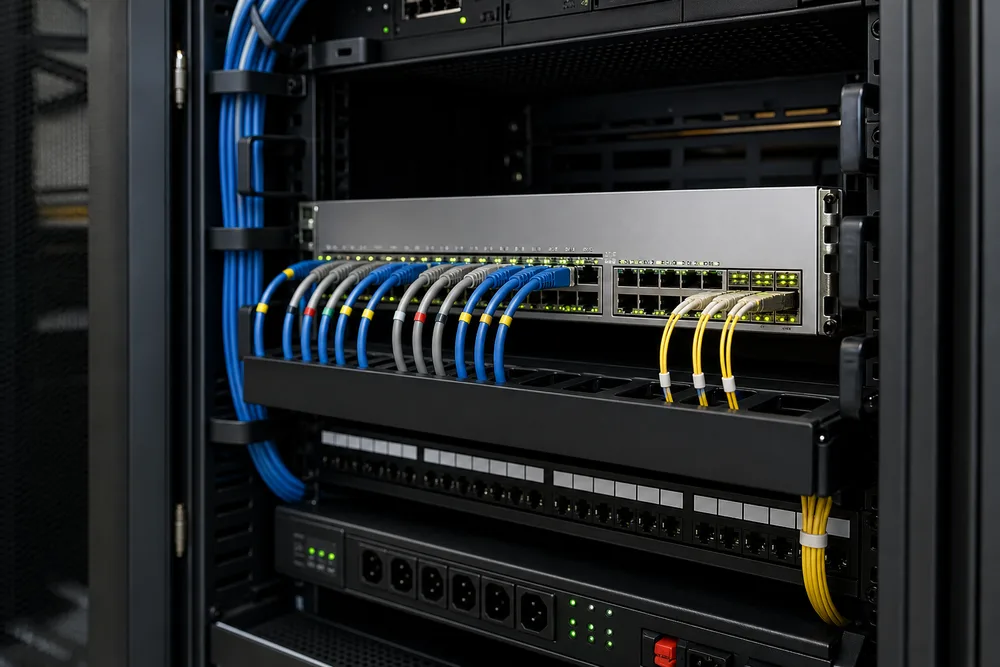
Fiber Ethernet Switches Connect Ethernet Devices to Fiber Network Links
A fiber Ethernet switch forwards Ethernet traffic between attached devices while providing one or more optical links for the network path. In a common layout, local PCs, access points, cameras, controllers, or downstream switches connect on copper ports; the fiber uplink returns traffic to a distribution switch, server room, or another building.
The benefit is not simply “more distance.” Fiber lets you design a physical link around the cable route, the installed fiber plant, and the optic type required at each end. That matters in buildings with separate communications rooms and on sites where electrical noise, grounding differences, or exposed outdoor pathways make a long copper connection a poor fit. A fiber link also gives you a clean boundary between network segments, although segmentation policy itself depends on the switch features and network design.
Buyers often overlook the interface distinction. A fixed optical port accepts only the connection type designed into that port. An SFP-based port accepts a compatible pluggable optical module, which gives you more flexibility—but it does not mean an optic is included. See OPTONE’s fiber switch options alongside the matching optics before finalising a bill of materials.
Choose the Switch Type Around Control, Power, and Installation Needs
Start with the job at the edge of the network. A small, stable connection point may need only basic forwarding. A cabinet carrying several users or critical devices may need visibility and configuration control. An outdoor enclosure or factory panel raises a different question: can the switch be mounted and powered appropriately for that location?
Managed and Unmanaged Switching for Different Levels of Network Control
Unmanaged fiber switches are intended for straightforward connections where you do not need to configure the switch. They can suit a simple device group or a fixed uplink where the network policy is handled elsewhere. Their appeal is simplicity, not control.
A managed fiber Ethernet switch is the better fit where your team needs to configure and monitor the device. Depending on the specific model, managed switching may provide functions such as traffic segmentation, port settings, monitoring, or redundancy-related controls. Do not assume every managed model has the exact protocol, security function, or monitoring method your network standard requires. Ask for the model datasheet and confirm the functions your operations team will actually use.
PoE/PoE+ and DIN-Rail Options for Powered and Industrial Edge Devices
PoE or PoE+ can send power and Ethernet data over the same copper cable to compatible edge equipment. This is useful for devices such as IP cameras, wireless access points, and other powered endpoints, provided the port type and the switch’s available power budget match the device requirement. The common purchasing error is checking only that a switch says PoE, then discovering the total connected load exceeds what that particular unit can supply.
DIN-rail fiber switches address another practical need: mounting in control cabinets and equipment enclosures. An industrial DIN-rail model should be selected around the site’s mounting arrangement, power input, environmental conditions, port mix, and service access—not merely because it fits on a rail. OPTONE lists industrial DIN-rail options, but enclosure ratings, temperature ranges, and power details must be confirmed for the selected product.
Where Fiber Switching Supports Campus, Enterprise, and Industrial Networks
Fiber Uplinks for Distributed Buildings, Branches, and Network Segmentation
In campus and enterprise networks, a fiber switch often sits at the access layer: it serves a local room or work area, then uses fiber to connect back to a central distribution point. This arrangement is useful across floors, between buildings, and at branch locations where the installed fiber plant is already part of the infrastructure.
Capacity planning changes the decision. A Gigabit fiber Ethernet switch may be appropriate for many access connections, while a 10G uplink can be necessary where several downstream ports concentrate onto one path. That is not a universal upgrade rule. Look at current traffic, expected growth, uplink contention, and the speed supported by the switches at both ends.
Industrial Fiber Connections for Remote Equipment and Control Networks
Industrial sites frequently place network equipment near machinery, remote panels, gates, utility areas, or process equipment. Fiber provides a transport option for reaching those locations without making a long copper run the default. The switch choice should follow the actual cabinet and network architecture: required copper device ports, fiber direction, mounting method, supply power, and the operating conditions documented for the installation.
Keep IT and operational requirements in the same review. A switch that has the needed optical interface but cannot be installed, maintained, or powered correctly at the panel is not a workable industrial selection.
How to Specify Fiber Uplinks, SFP Ports, and Network Capacity
Specify the link as a complete path, not as a switch port in isolation. Identify the fiber already installed or planned, the connector type, the required link distance, the data rate at each end, and whether the optic must be single-mode, multimode, WDM, or another suitable type. Then verify that the switch interface and module are compatible with the remote equipment.
For a fiber switch with SFP ports, confirm the supported module families and any compatibility requirements before ordering. OPTONE also supplies SFP-compatible optical transceivers, including options described as MSA compliant and OEM compatible. MSA compliance helps define a common module form factor and electrical interface; it does not replace checking the full compatibility matrix, wavelength, connector, and link design.
Port count deserves equal attention. Count current endpoints, but leave room for realistic additions and for the uplinks that carry aggregate traffic. Also establish whether copper ports are needed for local devices, whether optical ports are intended for uplinks or device connections, and whether redundant paths are a requirement. A spare port is useful. An unsupported optic or mismatched uplink speed is not.
Common Fiber Ethernet Switch Questions: Optics, Media Converters, and Compatibility
Do I need an optical transceiver for every fiber port? Only if the switch uses empty SFP or similar pluggable slots and the selected interface requires a module. Fixed fiber ports use their built-in optical interface. Check what is supplied with the exact switch.
Can a media converter replace a fiber switch? A media converter is suited to a point-to-point conversion between Ethernet copper and fiber. A switch is needed where multiple Ethernet devices must be connected and traffic forwarded among ports. OPTONE’s media converter range can be relevant for a single conversion point; it is not a substitute for multi-port switching.
Will any SFP work in any switch? No. Match the module to the port’s supported speed and compatibility requirements, then match the optics to the fiber path and the device at the far end. The link is only as correct as both ends.
Decision Checklist for an OPTONE Fiber Ethernet Switch Quote
- State the number and type of local device ports you need, including any PoE/PoE+ endpoints and their power requirements.
- Identify the fiber uplink speed, installed fiber type, connector, distance, and the equipment at the other end.
- Choose managed or unmanaged operation based on the control and monitoring functions your network requires.
- For industrial deployments, provide mounting, power, enclosure, and environmental requirements rather than requesting a generic industrial switch.
- Ask for confirmation of the exact switch model, included optics if applicable, module compatibility, and applicable testing or quality documentation.
Share those details when you request an OPTONE fiber Ethernet switch quote. It is the quickest way to avoid a port, optic, power, or mounting mismatch before equipment reaches the site.
Need help selecting the right product?
Share your switch platform, link distance and quantity with an OPTONE engineer.
Talk to an Engineer →