
AOC cables carry data over optical fiber with electronics built into the cable ends. DAC cables carry data over twinax copper between directly attached equipment ports. In practical terms, DAC is usually the first choice for short, controlled rack links; an active optical cable is often the better fit where copper becomes difficult to route, too heavy, or unsuitable for the required distance.
That distinction matters more than the label. A cable that fits the port can still be the wrong cable for the rack layout, airflow path, breakout topology, or switch compatibility requirement. OPTONE supplies AOC & DAC cables for data-center server-to-switch interconnects, with cable options positioned across 10G to 400G and lengths from 1 m to 100 m. The right selection starts with the actual link—not a default preference for fiber or copper.
AOC Uses Optical Fiber, While DAC Uses Copper for Direct Equipment Links
Direct attach copper is an assembly of twinax copper conductors and terminated connectors. It connects one network device directly to another without separate transceiver modules and patch cords. AOC follows the same direct-attach format at the equipment ports, but the cable section is optical fiber rather than copper.
Both are commonly used as fixed, short-to-medium data-center interconnects. Neither should be treated as a general-purpose structured cabling run. Their connectors, electrical interface, coding, and—where applicable—breakout arrangement must match the host ports.
The difference shows up physically on site. Copper is thicker and heavier as reach rises, which can turn a high-count cable trough into a crowded, hard-to-service bundle. Fiber-based AOC is typically easier to manage in dense paths, but it contains active electronics at both ends and needs power from the host ports. AOC also requires normal fiber handling discipline: do not crush it, kink it, or exceed its permitted bend radius.
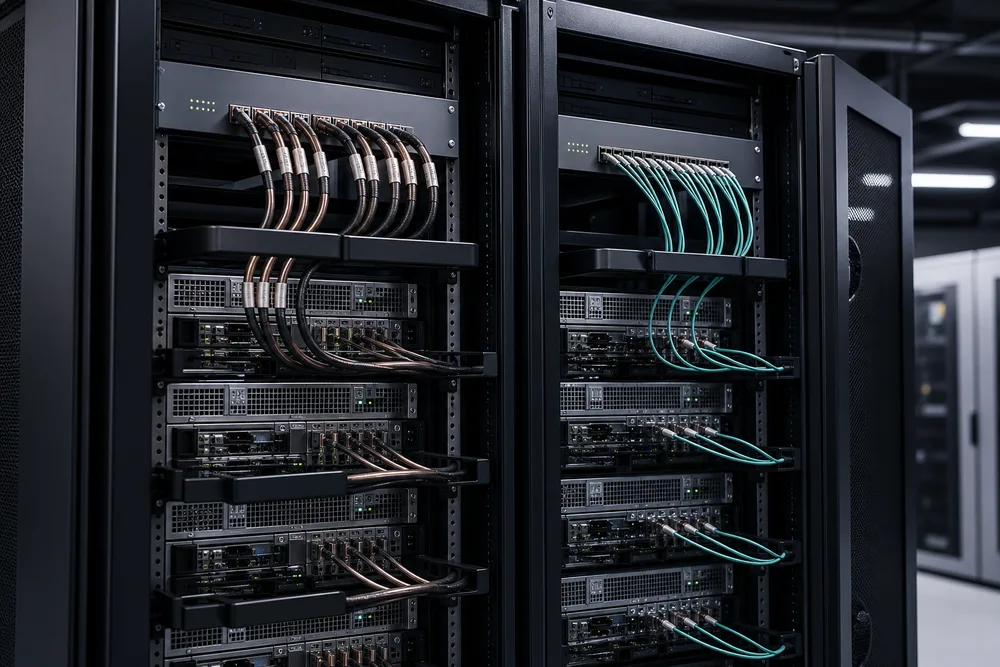
How DAC and AOC Cables Carry Data Between Server and Switch Ports
Both cable types present a direct interface to the server NIC, switch, router, or storage port. The host sends an electrical signal into the connector end; what happens through the cable is where the designs diverge. That is why reach, heat, routing, and power planning cannot be judged from connector shape alone.
DAC Cables Send Electrical Signals Through Twinax Copper
In a DAC assembly, electrical signals travel through shielded twinax copper conductors. Passive DAC has no active signal-conditioning electronics in the cable. It is simple, draws no cable-side power, and is often attractive for very short links within a rack.
Active DAC also uses copper, but includes electronics that condition the signal. It can extend the practical copper range beyond passive DAC in some applications. It is not automatically interchangeable with passive DAC, however. The host platform must support the cable type, and the supported length depends on the data rate, port implementation, cable construction, and vendor qualification. Avoid treating a published limit for one switch and speed as a universal DAC cable length limit.
AOC Cables Convert Signals for Transmission Through Optical Fiber
An AOC converts the electrical signal at one cable end for transport over optical fiber, then converts it back at the other end. This design avoids the electrical loss that becomes more difficult to manage over longer copper paths. It also produces a lighter, narrower cable body, which is useful where many links share vertical managers or overhead trays.
The trade-off is active operation. The equipment ports must supply the required power, and you should confirm that the platform accepts the cable’s form factor and coding. An AOC is not a substitute for separate pluggable optics and field-terminated fiber where patching, cross-connects, or changes in route are expected.
Compare Passive DAC, Active DAC, and AOC by Reach, Routing, and Power Considerations
Use the comparison below as a selection frame, not as a promise of supported distance. The host system documentation and cable qualification remain the final authority.
| Option | Signal medium | Best practical fit | Planning trade-off |
|---|---|---|---|
| Passive DAC | Twinax copper | Short, stable point-to-point links | Bulky copper becomes harder to route as length and cable count grow. |
| Active DAC | Twinax copper with active electronics | Copper links needing more reach than passive assemblies can support | Requires host support and cable-side power; still carries copper weight and diameter. |
| AOC | Optical fiber with active cable ends | Longer equipment links or dense cable routes | Requires port power and careful handling; not intended for field repair or re-termination. |
Power is often overlooked. Passive copper avoids cable-side active power, while active DAC and AOC consume power at the ports. In a dense switch deployment, confirm the platform’s thermal and port-power guidance rather than assuming every populated port behaves the same. Routing is the other missed cost: saving on cable unit price can be false economy if a heavy copper bundle blocks service access or complicates airflow management.
Choose the Cable Around the Rack Layout and Link Environment
Start with the physical route, then validate the interface. A clean bill of materials should identify the two host platforms, port form factors, speed, cable length, endpoint locations, and whether the connection is straight-through or breakout. That prevents the common mistake of ordering a cable by headline speed alone.
Short, Predictable In-Rack Links Often Suit Copper DAC
For a server connected to a top-of-rack switch a short distance away, DAC is frequently the sensible answer. The route is known, the cable remains accessible, and there is no need to build a separate optical channel. Passive DAC is especially appealing where the supported reach is comfortably within the rack design.
Choose active DAC only after checking host support. Buyers sometimes assume “active” means universally better. It does not. If passive copper already meets the distance and routing requirement, added active electronics may offer no practical benefit.
Longer Runs and Dense Cable Paths May Favor AOC
AOC is often easier to justify when links run beyond a simple in-rack jump, pass through crowded managers, or accumulate in high-density server rows. The smaller, lighter optical cable section can reduce congestion compared with a comparable copper path. This is a routing advantage, not a claim that every AOC is appropriate for every distance or environment.
For higher-density links, confirm the exact architecture before purchase. A 100G QSFP28 AOC is not simply a generic “100G cable”; its connector form, lane arrangement, and host support must match. The same applies to a 400G AOC breakout cable, where one high-speed port is divided into multiple lower-speed connections. Breakout type, endpoint port form factors, and supported lane mapping all need to be specified together.
Confirm Port Form Factor, Breakout Design, and OEM Compatibility Before Ordering
Compatibility has three parts: mechanical fit, electrical or optical interface behavior, and host acceptance. Begin with the exact port form factor at each end. SFP, SFP+, QSFP+, QSFP28, QSFP-DD, and OSFP are not interchangeable connector names. A connector that looks broadly similar may not fit, operate at the required rate, or support the intended breakout.
Next, state whether you need a straight cable or a breakout cable. A breakout assembly has a defined relationship between the high-speed end and the lower-speed ends; it is not a flexible adapter that can be repurposed at will. Ask the switch and NIC vendor documentation which breakout modes are supported by the relevant ports.
Finally, check platform compatibility. A compatible DAC cable for Cisco switches, for example, should be selected against the specific switch family, port type, software policy, and cable coding requirement—not only the Cisco name. OPTONE describes its products as MSA compliant and OEM compatible, with 100% testing. Those are useful supply-side controls, but you should still provide the endpoint make and model so the cable can be matched to your deployment. See OPTONE’s AOC and DAC cable options alongside the host compatibility requirements.
AOC and DAC Cable Quote Checklist for OPTONE
- State both endpoints: equipment manufacturer, model, port type, and required link speed.
- Measure the installed route: include vertical management, tray turns, and service slack rather than estimating from rack-to-rack spacing.
- Choose the cable family: passive DAC, active DAC, or AOC based on supported reach, bundle density, and port-power considerations.
- Define breakout clearly: identify the connector at every end and the host-supported breakout mode.
- Flag compatibility needs: specify any OEM coding or platform qualification requirement before the order is released.
- Plan the physical path: keep AOC within its handling guidance and make sure copper bundles will not obstruct access or airflow.
Send that information with your request for AOC & DAC cable sourcing. It gives OPTONE the details needed to recommend a cable category and compatibility approach without guessing at a specification that your network cannot accept.
Need help selecting the right product?
Share your switch platform, link distance and quantity with an OPTONE engineer.
Talk to an Engineer →