
The short answer: choose fiber when distance, interference, bandwidth, building layout, or expansion makes copper the constraint
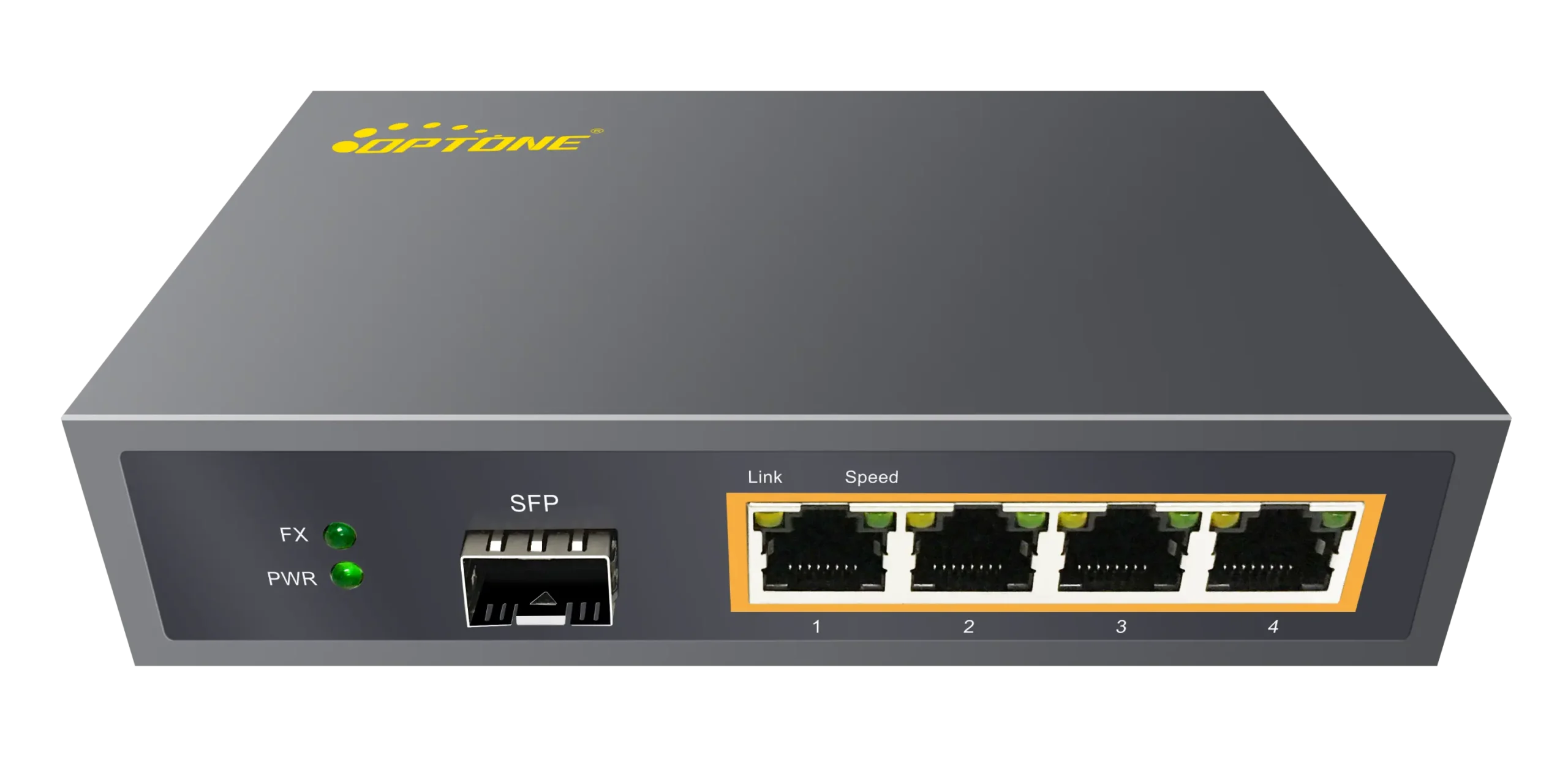
A business network needs a fiber Ethernet switch when ordinary twisted-pair copper can no longer deliver the required reach, electrical isolation, uplink capacity, or physical topology. The clearest threshold is distance: a standard copper Ethernet channel is generally limited to 100 meters, including patch cords. Once a permanent link approaches that boundary, fiber is usually the cleaner choice than trying to stretch copper beyond its design limit.
Distance isn’t the only trigger. Fiber is also appropriate between buildings, around motors and variable-frequency drives, beside high-voltage equipment, or anywhere electromagnetic interference causes packet errors and intermittent links. Because glass doesn’t conduct electricity, an all-dielectric fiber cable can also remove the metallic data path between structures. That doesn’t eliminate the need for grounding and surge protection on each building’s power system, but it avoids using a copper network cable as an unintended electrical connection.
Bandwidth and expansion matter just as much. A closet serving a few office users may run comfortably on copper. A distribution point aggregating access switches, cameras, wireless access points, servers, or storage traffic can outgrow a low-speed uplink quickly. Fiber switch ports fitted with the appropriate SFP-family transceivers let you choose the reach and optical medium for each uplink rather than commit the entire installation to one fixed cable type.
Don’t specify fiber merely because it sounds more advanced. Short desk-to-switch connections, small flat offices, and endpoints needing Power over Ethernet are usually better served by copper access ports. In many business networks, the right design is mixed: copper at the edge, fiber in the backbone.
Let the site map determine where fiber switching belongs
Start with buildings, pathways, closets, endpoint clusters, and power locations—not a switch catalog. Mark each telecommunications room and cabinet, then identify where traffic must converge. This exposes the places where a fiber Ethernet switch solves an actual physical problem.
A switch with fiber uplinks may belong in an existing access closet. A switch with several optical downlinks may serve as a central distribution point. In a warehouse or roadside cabinet, an industrial switch may sit close to field devices and carry aggregated traffic back over one or more fiber links. These are different jobs, even if all three products are described as fiber switches.
Inter-building and campus networks: central distribution, distributed access, and resilient paths
Fiber is the normal starting point for connecting separate buildings. Runs often exceed copper’s channel limit, and buried or aerial copper can create grounding, surge, and interference concerns. A campus design might place a distribution switch in the main equipment room and use dedicated fiber pairs to access switches in other buildings. Where uptime matters, separate physical routes can provide alternate paths, provided the switching design supports an appropriate loop-prevention or redundancy protocol.
Route diversity must be real. Two fibers in the same conduit, entering through the same wall penetration, don’t protect against an excavator or building fire. Buyers sometimes pay for redundant ports while leaving both links exposed to the same physical failure.
The uplink rate should follow measured and expected aggregate demand. Gigabit fiber may be sufficient for a lightly used branch building, while dense Wi-Fi, video, storage, or server traffic can justify a 10G uplink. Buying 10G everywhere without checking the traffic pattern wastes budget; installing a switch with no practical upgrade path can force an early replacement.
Surveillance zones, branch closets, and industrial cabinets
Camera networks illustrate why fiber and copper often work together. IP cameras typically need copper Ethernet and PoE at the endpoint, while the access switch uses fiber for the long return path. A PoE fiber switch for cameras is therefore usually a switch with copper PoE access ports plus one or more optical uplinks—not a device that sends electrical power through fiber.
Endpoint concentration determines the switch location. If several cameras, controllers, or access points occupy one zone, placing a local switch nearby can reduce the number of long cable runs. That local cabinet still needs power, thermal management, physical security, and enough PoE capacity for the connected devices.
Industrial installations add vibration, dust, temperature variation, electrical noise, and limited cabinet space. A DIN-rail fiber Ethernet switch may fit the mechanical arrangement better than a rack unit, but the mounting style alone proves little. Check the stated operating temperature, input-power arrangement, alarm outputs, ingress protection expectations, and any required industrial certifications for the actual model.
Compare a fiber switch with a media converter and an all-copper switch
The right comparison is based on the number of links, the need for management, and where traffic is aggregated. A media converter isn’t an inferior fiber switch; it performs a narrower job. It converts one Ethernet medium to another, commonly copper to fiber, without becoming the central connection point for multiple endpoints.
| Option | Best fit | Main advantage | Common limitation |
|---|---|---|---|
| All-copper switch | Short indoor links within copper distance limits | Low cost and straightforward PoE delivery | Limited reach and greater exposure to electrical interference |
| Fiber media converter | Adding fiber to one existing copper Ethernet link | Preserves existing switches and keeps the change small | Extra power supplies and devices become awkward across many links |
| Fiber-capable Ethernet switch | Aggregating several endpoints, buildings, cabinets, or optical paths | Concentrates switching and can provide management and higher-speed uplinks | Requires careful transceiver, fiber, and configuration planning |
For one point-to-point extension, a pair of fiber media converters can be simpler and less expensive. Once a site has several converted links, separate converter power adapters and patch cords become another failure surface. A fiber switch consolidates those connections and may expose link status, VLANs, traffic counters, and alarms through one management plane.
An all-copper switch remains the sensible choice when every run is short, the environment is electrically quiet, and endpoints need PoE. Fiber doesn’t make a local office access layer automatically faster; the port rate and upstream capacity still set performance.
Treat the switch, transceiver, and fiber plant as one compatibility chain
A fiber Ethernet switch isn’t a complete optical link by itself. The switch cage, transceiver, fiber cable, connectors, patch panels, and device at the far end must agree. Most failed purchases in this category aren’t caused by bad switching silicon. They come from ordering parts that fit physically but don’t communicate optically.
OPTONE describes a portfolio spanning fiber switches, media converters, AOC and DAC assemblies, and SFP- and QSFP-family optical transceivers. That breadth is useful only if every selected component is checked against the host equipment and installed fiber. MSA compliance supports common mechanical and electrical conventions, but it doesn’t guarantee that every switch vendor will accept every third-party module or that mismatched optics will establish a link.
Plan endpoint ports, uplink speeds, topology, and expansion headroom
Count ports by role. Separate local copper endpoints, PoE devices, fiber downlinks, uplinks, stacking or inter-switch connections, and any reserved failover ports. A switch advertised with a certain total port count may include shared or combo interfaces, so read the port-use rules rather than assuming every connector can operate simultaneously.
Next, draw the topology. A star centered on a distribution switch is easier to isolate and troubleshoot than an improvised chain of access switches. Daisy chains may be acceptable in constrained sites, but each downstream location depends on every upstream switch and power source. Rings can improve availability only when the hardware and configuration support the intended redundancy protocol.
Leave credible headroom. That means enough physical ports and uplink capacity for the known expansion plan, not an arbitrary doubling of everything. Also check whether a faster future uplink will require different transceivers, different fiber, or replacement of the switch itself.
Verify Ethernet rate, SFP family, fiber type, wavelength, connector, reach, and host compatibility
Work through compatibility in a fixed order. Confirm the Ethernet rate and the switch’s supported module form factor first. An SFP-shaped module isn’t automatically supported at every speed, and an SFP+ cage’s behavior with lower-rate modules depends on the host design and software.
Then match both ends of the optical link:
- Fiber type: single-mode and multimode optics must be paired with the intended cable plant.
- Wavelength and optical standard: conventional duplex links normally use matching transceivers. Bidirectional modules require complementary transmit and receive wavelengths.
- Connector and fiber count: verify connector type, polish where relevant, duplex or simplex operation, and patch-panel interfaces.
- Reach and optical budget: select optics for the actual path, including patch panels, splices, and expected loss. Excess reach is not a substitute for proper planning.
- Host acceptance: confirm that the switch recognizes the module and supports any required coding or vendor-specific identification.
DDM or DOM can report operating data such as optical transmit power, receive power, temperature, voltage, and laser bias when both the module and host expose those readings. It is valuable for diagnostics, but it doesn’t repair a dirty connector or make incompatible wavelengths match.
Management, PoE, and enclosure choices should follow operating responsibility
Choose features according to who will operate the network after installation. An unmanaged switch can be appropriate for a small, isolated extension where the traffic policy is simple and local staff won’t administer configuration. A managed switch earns its cost when the network team needs segmentation, fault visibility, controlled redundancy, security policy, or remote diagnostics.
Enclosure and power choices deserve equal attention. A rack switch in an air-conditioned room faces a different duty cycle from a DIN-rail unit inside a sun-heated cabinet. Product family labels aren’t enough; environmental and electrical ratings must be verified on the exact part number.
When managed features justify added cost and administration
Managed switching is justified when you need VLANs, spanning-tree controls, link aggregation, port statistics, SNMP monitoring, syslog, port mirroring, access control, or multicast handling. Supported details vary by switch, so don’t treat “managed” as a complete specification.
There is an operational downside. Configuration creates responsibility. Someone must back up settings, control firmware versions, protect management access, document VLAN assignments, and review alarms. A badly configured managed switch can cause more downtime than a simple unmanaged unit, especially if a loop-protection setting or tagged uplink is changed without understanding the wider topology.
PoE requirements and industrial DIN-rail environments
For PoE, verify more than the number of powered ports. Match the switch’s supported PoE standard to each endpoint, confirm the total power budget and per-port capability, and account for startup behavior and environmental derating documented by the manufacturer. Cameras with heaters, pan-tilt-zoom mechanisms, or infrared illumination may draw more power under certain conditions than their normal daytime load suggests.
Industrial cabinets require the same discipline. Check input voltage, redundant-power behavior, terminal-block arrangement, grounding instructions, operating temperature, cooling clearances, and mounting hardware. Fiber solves the data-link exposure to electromagnetic interference; it does not protect an inadequately powered switch or a poorly grounded cabinet.
Procurement evidence matters as much as the port list
A quotation should identify the exact switch configuration, supported optical interfaces, included accessories, power supplies, management level, operating environment, and compatible transceiver options. Generic photos and a port count aren’t enough for an OEM, campus, surveillance, or industrial deployment.
Require documented configuration, interoperability, factory testing, applicable compliance, warranty, support, and lead time
Ask the supplier to document what was tested together: switch model, firmware, transceiver part number, rate, wavelength, fiber type, and link partner. “Compatible” should refer to a known configuration, not merely the fact that a module fits into the cage.
OPTONE states that it manufactures fiber Ethernet switches alongside optical modules, media converters, and cable assemblies in Shenzhen, with ISO 9001-certified manufacturing, factory testing, MSA-focused product support, and OEM/ODM capability. Those claims give a procurement team useful questions to pursue. Request the applicable test records, quality documents, compliance declarations, warranty terms, return process, technical-support route, and production lead time for the products being quoted. Certification scope should always be checked rather than inferred across an entire catalog.
For repeat orders, control revisions. A change in switch chipset, firmware, optical component, or power supply can affect interoperability even when the commercial product name looks unchanged. Distributors and OEM buyers should agree on change-notification expectations and approved substitutions before volume deployment.
Troubleshoot a failed SFP link from the physical layer outward
Start with what can be seen and verified. Confirm that both devices are powered, enabled, and configured for the intended Ethernet rate. Check that the switch accepts the installed modules and isn’t reporting an unsupported-transceiver or loss-of-signal alarm.
Next, inspect the link as a matched pair. Verify module labels at both ends, fiber type, wavelength, reach class, connector type, and polarity. On duplex fiber, transmit at one end must reach receive at the other. On bidirectional links, the two modules must use complementary wavelengths. A single incorrect patch lead can leave both devices looking healthy while the link stays dark.
Clean and inspect connectors using proper fiber procedures before swapping equipment. Dust and end-face contamination are common causes of intermittent service and high optical loss. If DDM/DOM readings are available, compare transmit and receive levels with the module’s documented operating limits. No received power points toward polarity, cabling, connector, or remote-transmitter trouble; a marginal reading suggests loss, contamination, bending, or a damaged path.
Only after the physical link is stable should you move outward to VLAN tagging, spanning-tree state, link aggregation, access controls, IP configuration, and routing. Replacing a switch won’t correct crossed fibers or mismatched optics.
Decision checklist: confirm the use case, link plan, compatibility, power, environment, evidence, and support
- Use case: Is copper constrained by its normal channel limit, interference, inter-building exposure, bandwidth, or the need to aggregate several remote links?
- Site plan: Are switch locations, pathways, endpoint clusters, power sources, and genuinely diverse backup routes marked on the site map?
- Port plan: Have you separated copper access ports, PoE ports, fiber links, uplinks, and reserved expansion capacity?
- Compatibility: Do Ethernet rate, SFP family, fiber type, wavelength, connector, reach, link partner, and host acceptance match at both ends?
- Operations: Does the team actually need managed features, and can it maintain configurations, firmware, monitoring, and access controls?
- Power: Is the PoE budget adequate for endpoint startup and peak demand, and is cabinet power suitable for the switch?
- Environment: Does the exact model meet the site’s temperature, mounting, grounding, vibration, and enclosure requirements?
- Evidence: Has the supplier documented configuration, interoperability, factory testing, applicable compliance, revision control, and included accessories?
- Support: Are warranty handling, technical escalation, replacement availability, and lead time acceptable for the business impact of a failed link?
Need help selecting the right product?
Share your switch platform, link distance and quantity with an OPTONE engineer.
Talk to an Engineer →