
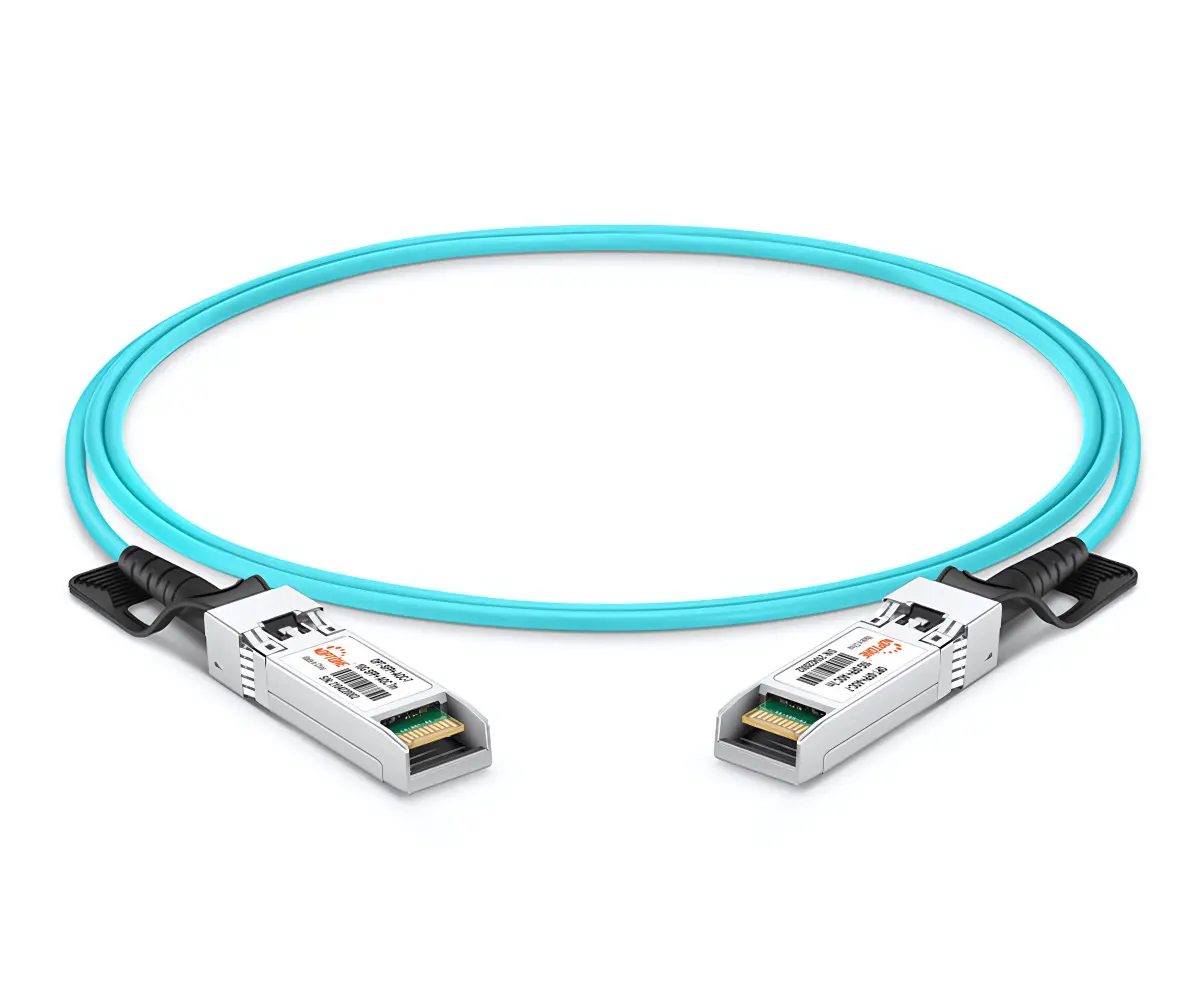
What is a DAC cable?
DAC stands for Direct Attach Copper. It is a fixed-length copper cable — usually twinax — with the transceiver-style connectors molded directly onto each end. There is no separate, removable module: the connector and the cable are one piece, and they directly attach two switch, server, or storage ports together.
Most DACs are passive: no electronics at all, just copper wire. The signal travels as electricity from one end to the other. Because there is nothing to process the signal, a passive DAC is extremely cheap, consumes almost no power (around 0.1 W per end), and adds essentially no latency.
The trade-off is distance. At 100G, the IEEE 802.3 standard (100GBASE-CR4) supports passive copper links up to roughly 7 meters. At higher speeds the budget shrinks further — 400G passive DACs typically top out around 3 m. DAC is therefore an intra-rack technology: server to top-of-rack switch, or switch to switch in the same rack.
What is an AOC cable?
AOC stands for Active Optical Cable. It looks like a DAC at a glance — same pluggable connectors on both ends — but inside each connector sits a small optical engine: a laser (VCSEL), photodiodes, and driver electronics that convert the electrical signal to light. The light travels through pre-terminated multimode fiber (OM3/OM4) between the two ends.
Because the medium is fiber, AOC breaks the copper distance ceiling:
- Typical AOC links run 30–100 m; a 100G QSFP28 MMF AOC is commonly specified at up to 100 m.
- EMI immunity.Fiber is a dielectric — it carries no electrical signal, so it is completely immune to electromagnetic interference from power supplies, high-current lines, and dense neighboring cables.
- Weight and airflow.Fiber is dramatically lighter and thinner than twinax, with a smaller bend radius (roughly 30 mm vs ~75 mm for thick DAC), so high-density racks cool and cable more easily.
- The integrated assembly keeps connectors sealed, avoiding the dust contamination that plagues field-attached optical patch cords; BER is typically below 10−12.
The cost is power and price: each AOC end draws on the order of 2.2 W for a 100G assembly (typical, with retiming), and an AOC costs more than a comparable short DAC.
Active DAC (ACC): the middle option
Between plain passive DAC and AOC sits the active copper cable (ACC) — sometimes called active DAC. It is still copper, but a small signal-conditioning chip inside the connector housing re-drives the signal, extending reach beyond what passive copper allows.
Practical active DAC links run to about 10 m at common 10/25G speeds (some vendor families reach further at lower rates). ACC costs more than passive DAC and draws slightly more power, but it stays far cheaper than optics and keeps DAC’s low latency and copper price point. It is the compromise option when a link is almost inside passive-DAC reach.
Key differences at a glance
Three cable families cover almost every short-reach data center link. Here is how they compare:
|
Dimension |
Passive DAC |
Active DAC (ACC) |
AOC |
|
Typical reach |
1–7 m (100G); ~3 m at 400G |
~10 m (10/25G) |
30–100 m |
|
Power per end |
~0.1 W |
Slightly above DAC |
~2.2 W (100G) |
|
Latency |
Negligible |
Negligible + chip delay |
Adds ns-level optical conversion |
|
Weight & bend radius |
Heavy, ~75 mm bend |
Heavy, ~75 mm bend |
Light, ~30 mm bend |
|
EMI immunity |
Susceptible |
Susceptible |
Immune (dielectric fiber) |
|
Field replaceable |
Whole cable |
Whole cable |
Whole cable |
|
Relative cost |
Lowest |
Low |
Higher |
|
Best for |
Intra-rack, server to ToR |
Slightly longer in-rack / adjacent-rack |
Rack-to-rack, across aisles, EMI-heavy zones |
Reach at a glance
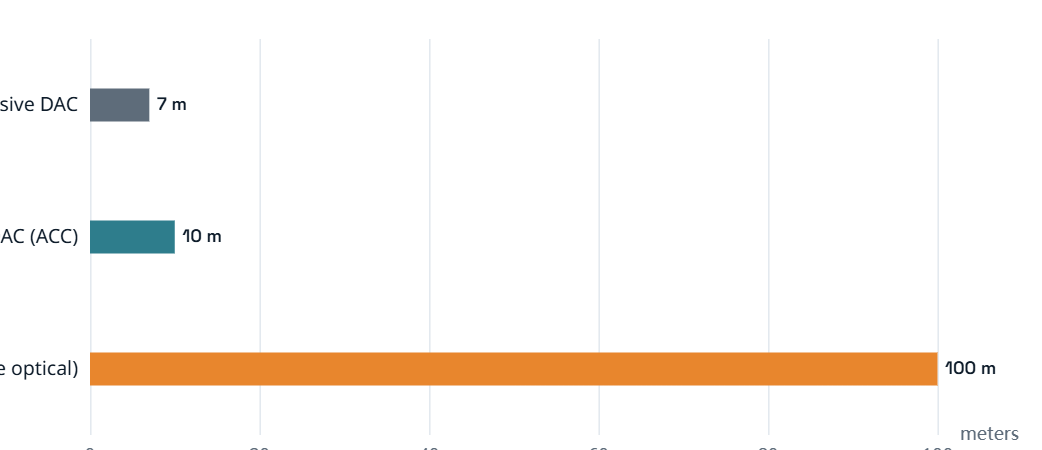
Typical maximum link reach. Passive DAC: ~7 m at 100G per IEEE 802.3 100GBASE-CR4 (shorter at 400G+). Active DAC/ACC: ~10 m at common speeds. AOC: 30–100 m on OM3/OM4 multimode fiber. Sources: IEEE 802.3, NVIDIA cable documentation, FS official Q&A.
Power at a glance
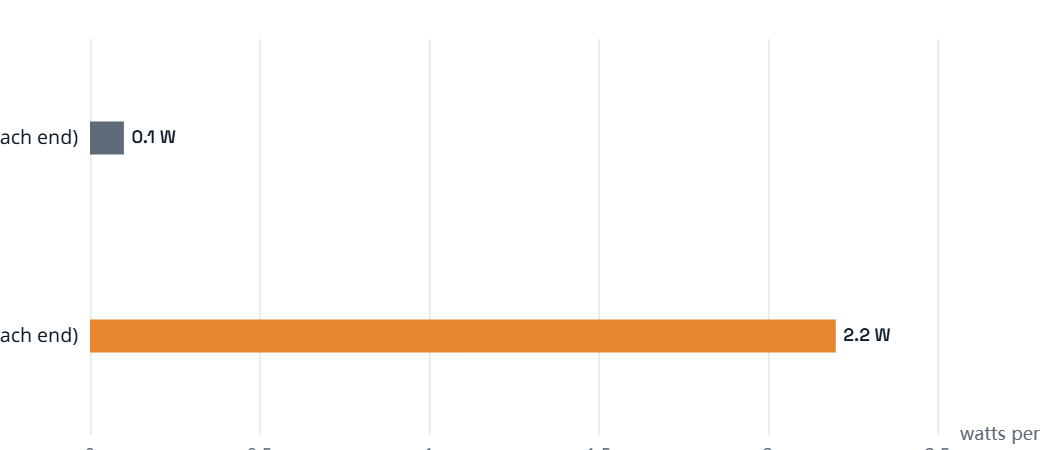
Typical power draw per cable end (100G class). DAC: ~0.1 W (no electronics). AOC: ~2.2 W (optical engine with retiming). Figures vary by speed and vendor — see references. Source: NVIDIA product specifications.
Which number matters most? In a dense rack with dozens of cables, AOC’s extra watts per end add up and generate heat. If most of your links are short, passive DAC keeps the port power budget — and the cooling bill — low.
When to use DAC vs AOC
Choose DAC when:
- The link is inside a rack or between directly adjacent racks — almost always ≤7 m.
- You want the lowest cost per port and the lowest power draw.
- Latency is critical and you want zero optical conversion in the path.
- You need breakout fan-outs — for example a 100G QSFP28 port split into four 25G SFP28 links, widely done with breakout DACs.
Choose AOC when:
- The link crosses an aisle, a row, or a cold-aisle gap — typically beyond ~10 m.
- Links run near power supplies, motor drives, or other EMI-heavy equipment.
- Weight and airflow matter: high-density spines, AI/HPC clusters, or switch fabrics where thick copper blocks cooling.
- You want the same integrated, sealed assembly to replace fragile patch-cord optics.
In a typical leaf-spine design the pattern is simple: DAC inside the rack, AOC across the rack. Top-of-rack switches talk to their servers over passive DAC; leaf switches connect to the spine over AOC when distances exceed copper’s reach.
What to check before buying
- Match the form factor and speed.SFP+ (10G), SFP28 (25G), QSFP+ (40G), QSFP28 (100G), QSFP-DD / OSFP (400G and up). Both ends of a DAC or AOC must fit the ports you are connecting — a QSFP28 cable will not plug into an SFP28 port without an adapter.
- Measure the real distance.DAC reach limits are not suggestions. A 7 m passive DAC at 100G that is actually run at 7.5 m through cable trays can fail or force FEC on.
- Check vendor compatibility.Some switches list supported cable vendors in their compatibility matrix. Using an unsupported DAC/AOC can disable diagnostics or management — ask the switch vendor or choose a model on their list.
- Understand FEC.At 100G, longer copper links (CA-25G-L, 3–5 m class) rely on RS-FEC. If the switch and cable do not agree on FEC settings, the link may not come up.
- Plan for temperature and airflow.In high-density racks, copper’s rigidity blocks airflow; fiber’s smaller bend radius keeps trays tidy. Keep at least the bend radius in mind when routing.
- Think in cable families, not single cables.A deployment mixing passive DAC, ACC, and AOC is normal — the skill is choosing the right family per link, not standardizing on one.
Common mistakes to avoid
- Running a passive DAC beyond its rated length and blaming the switch when the link drops.
- Assuming “DAC” and “AOC” are interchangeable — they are not; the reach, power, and price profiles are different.
- Buying the wrong form factor (e.g., QSFP28 where the port is SFP28, or 40G cable on a 100G port expecting auto-negotiation).
- Ignoring FEC requirements on longer copper links, then wondering why 100G links flap.
- Using optical patch cords with loose connectors where a sealed AOC assembly would avoid dust contamination.
- Choosing AOC for a 3 m intra-rack link and paying for reach and power you do not need.
Frequently asked questions
What is the difference between AOC and DAC cables?
DAC (Direct Attach Copper) is a copper cable with connectors molded on both ends — no electronics in a passive DAC, so it is cheap, low-power, and short-reach (typically up to ~7 m at 100G). AOC (Active Optical Cable) embeds an optical engine in each connector and carries data as light over fiber, reaching 30–100 m with full EMI immunity, at higher power and cost.
How long can a DAC cable be?
A passive DAC is typically rated up to ~7 m at 100G (IEEE 802.3 100GBASE-CR4), and less at higher speeds — 400G passive DACs usually top out around 3 m. An active copper cable (ACC) with signal conditioning extends reach to roughly 10 m at common 10/25G speeds.
How far can an AOC cable reach?
Most AOCs are rated from 30 m up to 100 m on OM3/OM4 multimode fiber. Beyond that, you typically step up to optical transceivers with single-mode optics.
Do DAC and AOC cables use the same ports?
Yes — a DAC and an AOC with the same form factor (for example both QSFP28) plug into the same switch or server port. The port cannot tell whether it is talking over copper or fiber; the cable handles the medium internally.
What is a breakout cable?
A breakout cable fans one high-speed port out to several lower-speed ports — for example a 100G QSFP28 cable that splits into four 25G SFP28 links. Breakout DACs are common in server deployments where one switch port feeds multiple servers.
Which is cheaper, DAC or AOC?
DAC is the cheapest option per link at short reach, and AOC costs more because of the optical engines in each connector. AOC becomes cost-effective when the link is too long for copper — comparing a long AOC against multiple DACs plus extra switches, or against fragile patch-cord optics.
OPTONE supplies 10G through 400G AOC and DAC assemblies with OEM-compatible coding and custom lengths.https://fibertransceiver.com/
Need help selecting the right product?
Share your switch platform, link distance and quantity with an OPTONE engineer.
Talk to an Engineer →